

Best Shopify CRO Strategies to Double Your Conversion Rate
Shopify conversion rate optimization (CRO) is the process of turning more of your existing store traffic into paying customers, without spending another dollar on ads. The formula: (total conversions ÷ total visitors) × 100.
You bring visitors to your online shop, but sales remain low. High ad costs drain your budget fast. Proven Shopify CRO strategies fix this exact issue.
Empty carts mean wasted ad dollars. Every lost visitor costs you profit while your competitors grab those sales.
This guide breaks down simple fixes across your entire funnel. You will learn easy updates for your product pages, checkout, site speed, and trust signals.
What is Shopify CRO?
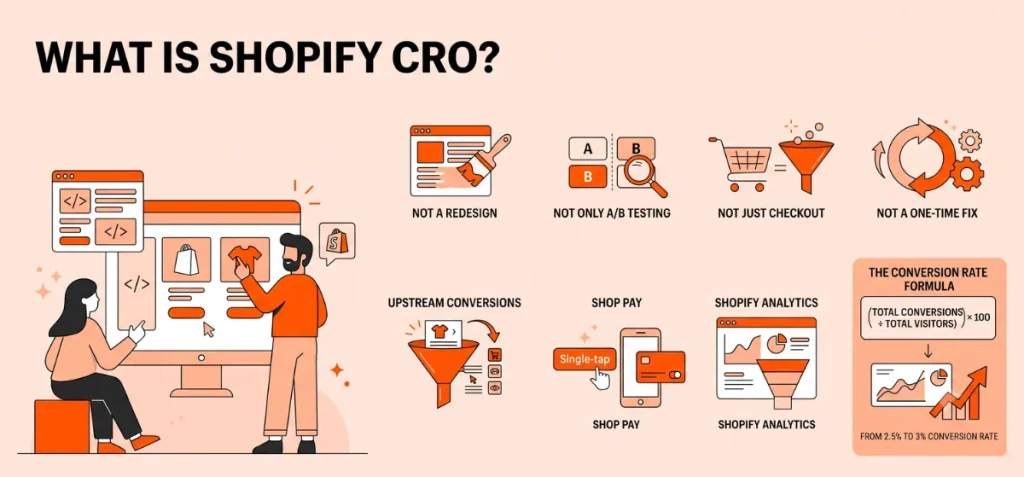
Shopify conversion rate optimization (CRO) means increasing the percentage of visitors who complete a specific action on your site.
In e-commerce, that action is usually a purchase. In marketing more broadly, it can mean a form fill, a trial signup, or a lead.
When people search “CRO meaning marketing,” they’re often asking about that wider definition. Shopify CRO narrows it back down to one thing: getting more of your store visitors to buy.
The formula stays simple:
Conversion rate = (Total conversions ÷ Total visitors) × 100
Let’s say your store pulled in 12,000 visitors last month and closed 300 sales. That’s a 2.5% conversion rate.
Push that to 3%, and you’ve added 60 sales from the same traffic without spending an extra buck.
What Makes Shopify CRO Different
CRO on Shopify isn’t identical to CRO on a custom-built site. Three things change the playbook:
- Shopify’s checkout already converts better than most alternatives, so your biggest wins often sit upstream of it. They can be on product pages and navigation, not inside checkout itself.
- Shop Pay remembers buyers across every Shopify store. Once a customer saves their details anywhere on the network, they can check out on your site with a single tap.
- Shopify Analytics gives you funnel and behavior reports natively, so you don’t need a third-party tool just to see where visitors drop off.
What CRO is Not
A few things worth clearing up before you start testing:
- It’s not a redesign project. Real CRO moves in small, measured changes, not a full relaunch you hope performs better.
- It’s not the same as A/B testing. A/B testing is one tool inside the CRO process. It isn’t the whole process.
- It’s not just checkout. Drop-off happens across the whole funnel. It can be your homepage, category pages, product pages, cart, and checkout.
- It’s not a one-time fix. Customer behavior shifts, so the highest-performing stores treat CRO as ongoing. It isn’t a project with an end date.
Best Shopify CRO Strategies
The rest of this guide moves step-by-step through the sales funnel:
Homepage ➔ Product Page ➔ Cart Drawer ➔ Checkout ➔ Post-Purchase.
Once we cover the core funnel steps, we will tackle the site-wide foundations: speed, personalization, trust signals, and retention marketing.
Homepage & Navigation
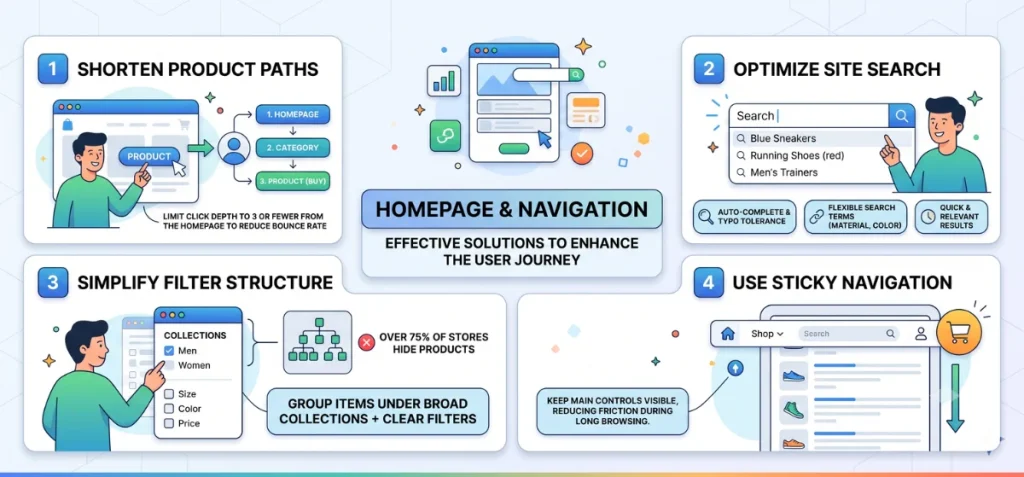
Here are the fixes for the homepage and navigation.
Shorten Product Paths
Limit click depth across your store. Shoppers should reach any product in three clicks or fewer from the homepage. Longer paths drive visitors away before they see your catalog.
Optimize Site Search
Build a powerful search experience. Enable auto-complete, typo tolerance, and flexible search terms instead of strict exact matches.
Simplify Filter Structure
Avoid creating dozens of tiny subcategories. Group items under broad collections paired with clear filters instead. Over 75% of online stores make this mistake, hiding matching products from eager buyers.
Use Sticky Navigation
Keep main controls visible as users scroll down pages. A sticky menu keeps cart icons, search bars, and account links within immediate reach, cutting friction on long browsing sessions.
Product Pages
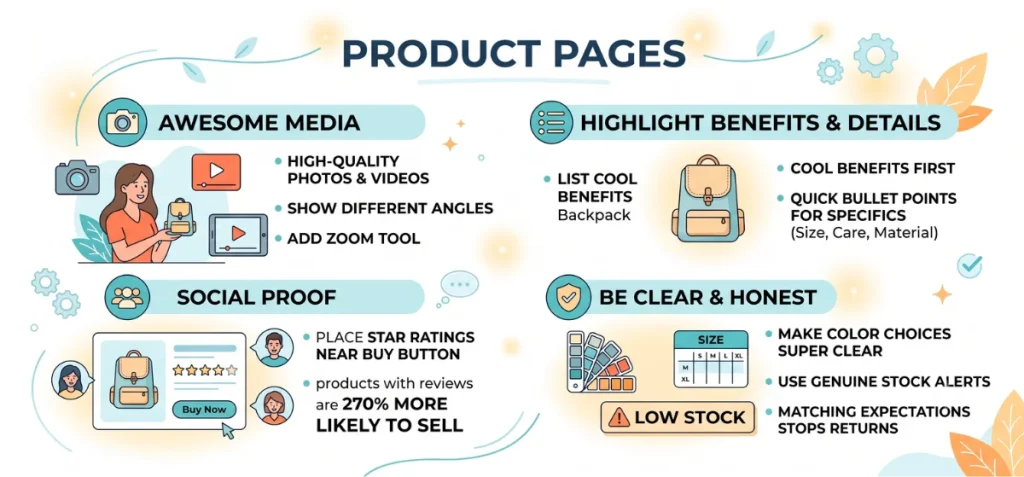
Product pages do most of the talking on your site. This spot is where shoppers make up their minds, so make it count.
Show off your stuff with awesome photos and quick videos. Show different angles, add a zoom tool, and include pictures of real people using the item. A short 15-second video helps buyers see how an item actually looks, moves, or fits in real life.
Talk about cool benefits first, then list the boring details. Place quick bullet points for size, care, and materials right underneath so readers find what they need fast.
Place star ratings and customer reviews right next to the buy button. Research from Northwestern’s Spiegel Research Center shows that products with just five reviews are 270% more likely to sell than items with zero reviews.
Only use countdown clocks or stock alerts when they are real. Fake “only 3 left!” warnings trick no one. Once a customer sees that same message next week, they stop trusting your shop entirely.
Make size charts and color choices super clear. When a buyer picks a red shirt, an image tool like Echo Swatch switches the main photo to the red shirt right away.
Also, you can consider using Shopify CRO Apps like Echo Bundle or Echo Swatch, which helps to boost your sales from the same numbers of visitors.
Matching expectations stops shoppers from returning items later.
Cart & Micro-Conversions
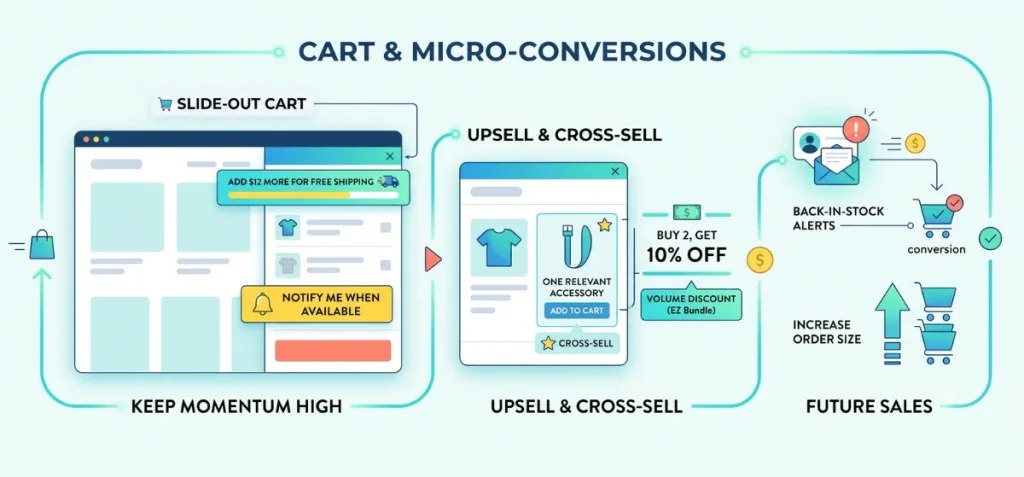
Treat your shopping cart as an active decision point. Smart cart setups keep momentum high and guide buyers toward checkout.
Use a slide-out cart drawer to keep shoppers on the page. Visitors review chosen items instantly without full-page reloads.
This drawer creates a great spot for a free shipping progress bar, like “add $12 more for free shipping,” which increases average order value.
Capture interest on sold-out products with back-in-stock alerts. Visitors select “notify me when available” instead of leaving your store forever. This simple feature turns lost visits into future sales at zero extra cost.
Add one relevant cross-sell item inside the cart drawer. Suggest a single matching accessory or volume discount with Echo Bundle rather than a massive product wall.
A focused recommendation increases order size without slowing down the buyer.
Checkout
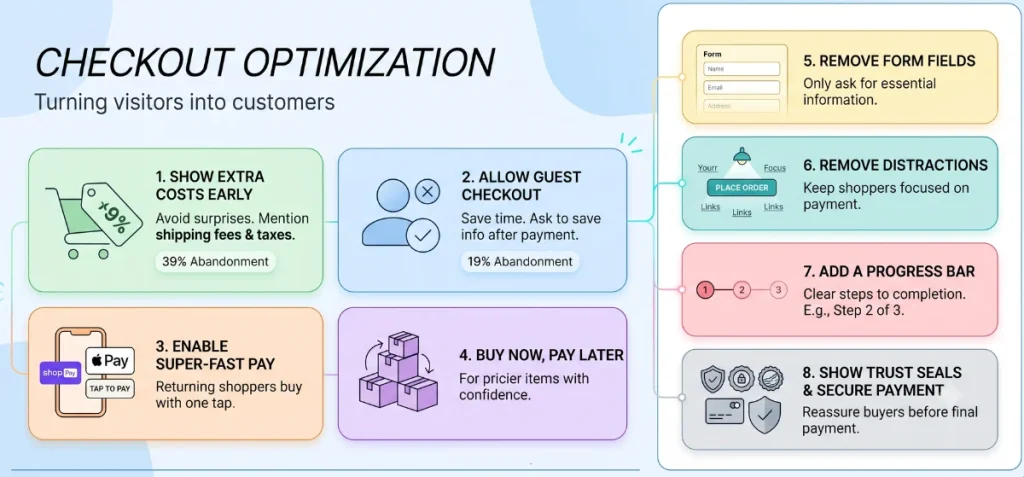
Checkout is the big moment. This step turns curious visitors into happy paying customers.
Show all extra costs early in the process. Nobody likes bad surprises. Studies by Baymard Institute show that 39% of shoppers leave without buying if sudden shipping fees or taxes pop up at the end.
Let people buy as guests without making an account first. Forcing visitors to create an account causes 19% of buyers to walk away. Ask them to save their info after they finish paying instead.
Turn on super-fast payment buttons like Shop Pay, Apple Pay, and Google Pay. Returning shoppers can buy stuff with a single tap instead of typing long addresses or card numbers.
Offer a buy-now-pay-later option for pricier items. Doing so will help people buy expensive items with confidence.
Delete every form box you do not really need. Remove extra fields like title, company name, or email confirmation. Ask only for basic information needed to ship the box.
Remove distraction links on the pay page. Taking away the “return to cart” button keeps shoppers focused on finishing their order.
Add a simple progress bar like “Step 2 of 3” for multi-page checkouts. Clear steps show shoppers exactly how close they are to finishing.
Show security seals, credit card logos, and a clear return policy link near the final pay button. A few trust icons reassure buyers right as they enter card details.
Post-Purchase & Retention
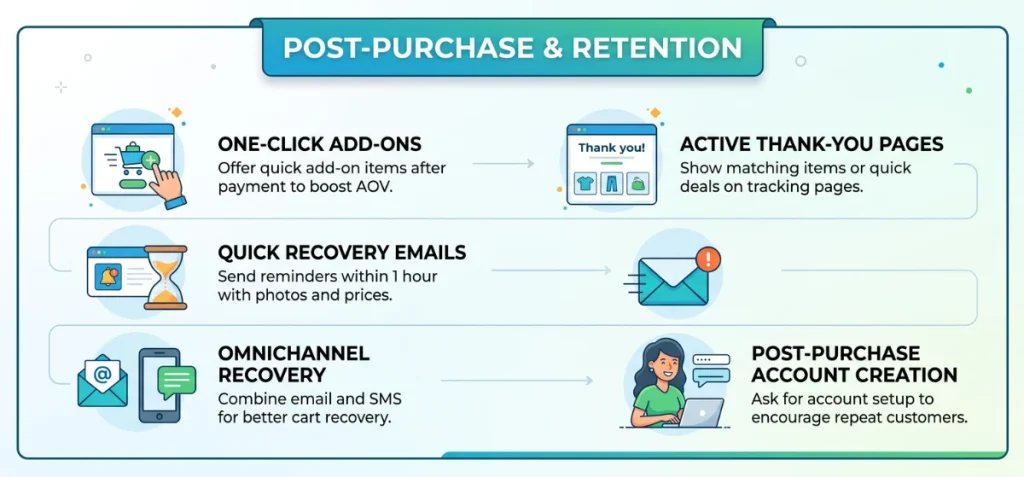
CRO doesn’t end at the order confirmation screen. The moment after checkout holds massive potential for your store.
Offer a quick one-click add-on right after payment. Buyers already typed their credit card details. Suggest an affordable extra item before the final page loads to boost order values fast.
Turn your thank-you page into a sales tool. Shoppers visit order tracking pages multiple times. Show matching items or quick deals on these pages instead of displaying a plain receipt.
Send cart recovery emails within one hour of drop-off. Quick messages bring buyers back while interest stays high. Include exact product photos and prices so shoppers remember what they left.
Combine email and text messages for better recovery. Some people check email, while others read texts. Mix both channels based on user activity to save lost sales.
Ask customers to make accounts after they buy. Buyers share details happily once the order finishes. You get repeat customers without slowing down the initial sale.
Site Speed & Core Web Vitals
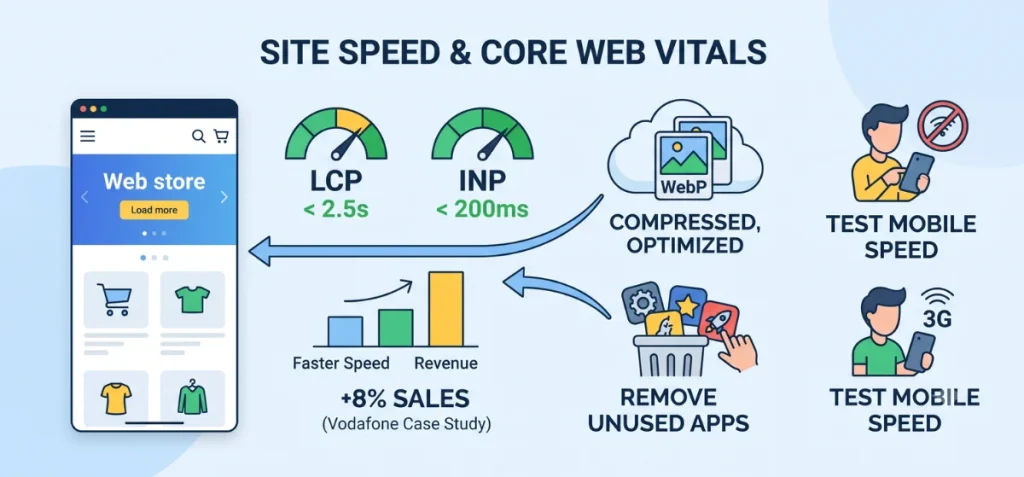
Site speed affects every single page on your store. Slow pages drive customers away before your content even loads.
Google tracks three main speed scores through its Core Web Vitals documentation:
- LCP (Largest Contentful Paint): How fast your main content loads. Keep it under 2.5 seconds.
- INP (Interaction to Next Paint): How fast a page responds to a tap or click. Aim for under 200 milliseconds.
- CLS (Cumulative Layout Shift): How much the page layout jumps around while loading. Keep this score below 0.1.
Faster speeds bring more revenue. A case study on web.dev showed that Vodafone improved LCP speed by 31%, which boosted sales by 8%. Speed was the only thing they changed.
Compress your photos first. Heavy product images slow down store pages fast. Save images as WebP or AVIF files, and resize photos before uploading them to Shopify.
Remove unused apps every few months. Extra apps add heavy background code that slows down pages, even on pages where those apps do nothing. Delete any app your store does not need.
Test mobile speed on slow cell connections. Most shoppers use phones on mobile networks, not fast home Wi-Fi. Fix mobile speed issues first to keep shoppers happy.
Personalization & AI-Driven Discovery
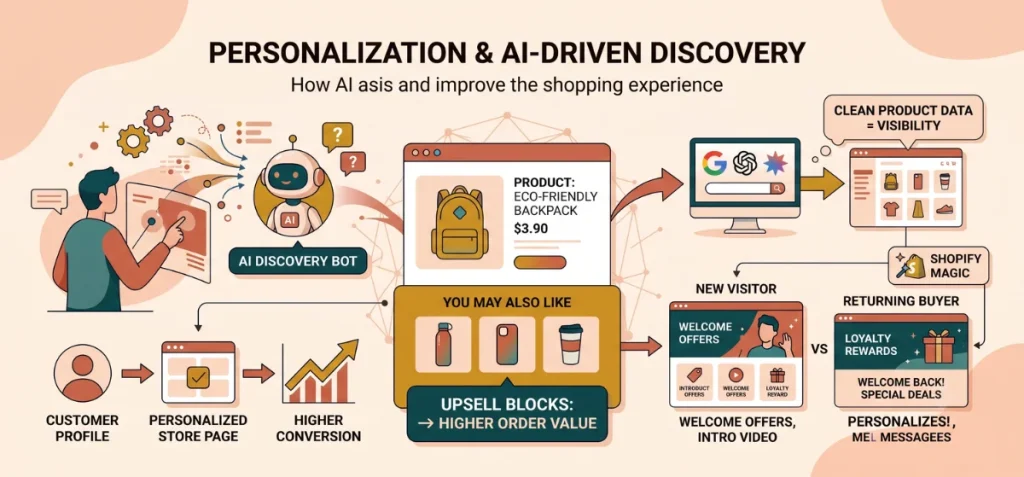
Shoppers use AI tools to find products today. Personalized store pages convert far better than static ones.
Product recommendations bring massive sales. Use built-in Shopify blocks like “you may also like” on product pages and carts to lift order values.
AI search traffic is growing fast. Shopify data confirms that AI-referred traffic from ChatGPT, Perplexity, and Gemini converts at 50% higher rates than organic search.
Your catalog can appear inside AI search tools automatically. Clean data makes this happen. Keep your prices, stock counts, and descriptions accurate so AI bots show your products to shoppers.
Change page content based on visitor history. First-time visitors need different messaging than returning buyers.
A free tool like Shopify Magic can create customer segments and write custom page copy in seconds. Start simple by swapping hero images for returning shoppers.
Trust, Credibility & Accessibility
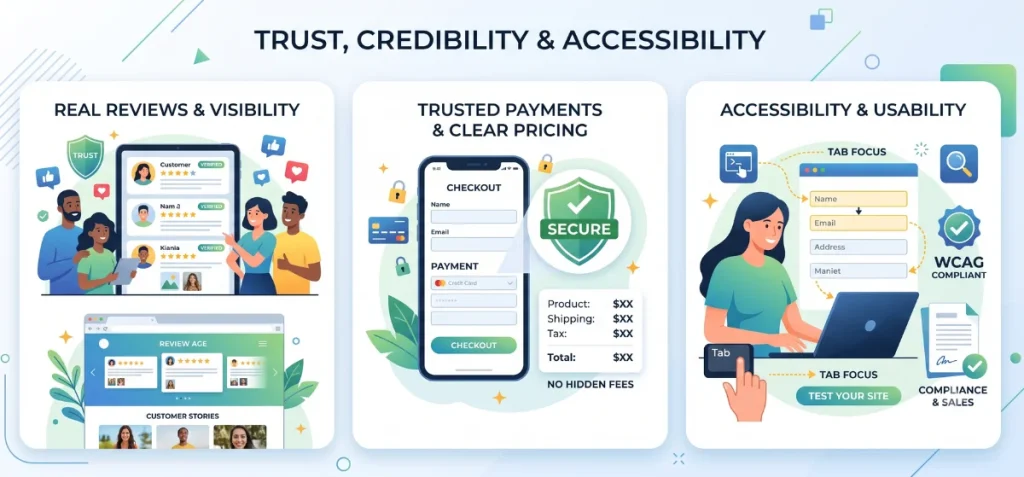
You need trust across your whole site, not just at checkout. Shoppers look for proof that your shop is real from the moment they land on your homepage.
Start with real reviews instead of plain star ratings. Buyers look for photo uploads, verified tags, and honest feedback. A few four-star reviews build more trust than a perfect score that looks fake. Feature these customer stories on your homepage and collection pages so visitors see them early.
Place one recognizable trust badge next to your payment fields. Shoppers consistently feel safest when they see well-known icons. Pick one trusted seal instead of cluttering your payment area with five random badges.
Show full prices before anyone opens a cart. Display estimated taxes and shipping costs on product pages directly. Clear numbers make your brand look honest and prevent bad surprises at checkout.
Fix small accessibility bugs to protect your store from lawsuits and lost sales. Common issues like hard-to-read text, missing image tags, and unlabeled form boxes stop screen readers completely.
Test your checkout flow with a keyboard. Press the Tab key to walk through the entire order process without a mouse. If your cursor skips key fields, keyboard users get stuck and leave without buying.
Marketing-Channel CRO
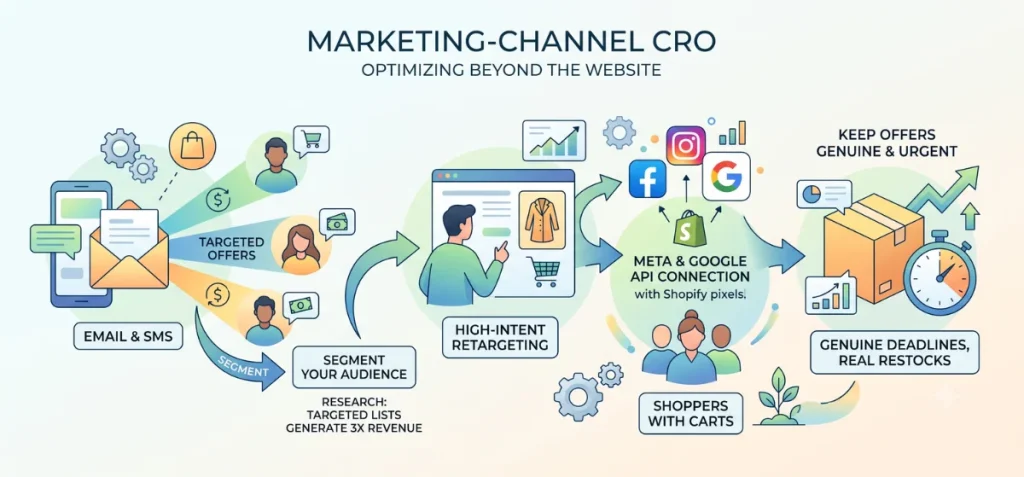
CRO optimization extends far beyond your website. Marketing channels like email, SMS, and retargeting ads require the same attention as on-site pages.
Group your audience into specific segments before you send any campaign. Research by Klaviyo shows that targeted email lists generate over three times more revenue per recipient than generic email blasts.
Sending one generic message to everyone wastes your budget. Divide your buyers by past purchases, total spend, or order count. Send custom offers to single-time buyers and separate rewards to repeat customers.
Target high-intent visitors instead of every random user who leaves your site. A shopper who leaves an expensive coat in a cart has far more purchase intent than someone who leaves after four seconds.
Connect Shopify’s native pixel and server-side Conversions API to Meta and Google. Focus your retargeting budget on shoppers who add items to their carts first.
Keep urgent offers completely real. Flash sales work well when deadlines are true. Save urgent language for genuine restocks, real deadlines, or limited product runs.
Shopify CRO Tools Stack
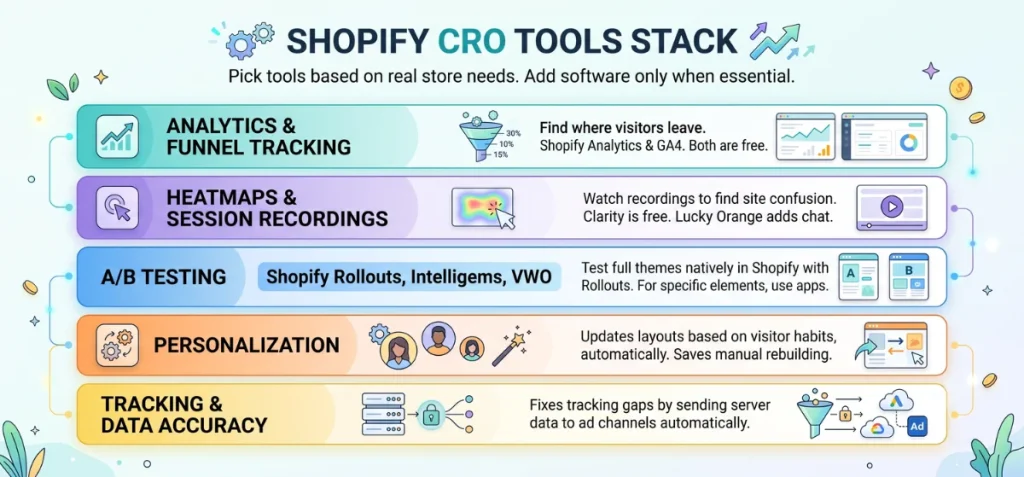
Pick tools based on real store needs. Add new software only when you must answer a specific business question.
One update is worth knowing before you shop for a testing tool. Shopify shipped its own native A/B testing feature, called Rollouts, in June 2026.
It lives inside Markets in your admin, with no app required. Because it runs server-side, there’s no added page-speed cost either.
It only compares whole experiences against each other, though, not single elements like a button color or a headline.
Price tests, discount logic, and granular content changes still need a dedicated app.
| Category | Recommended Tools | Purpose |
| Analytics & Funnel Tracking | Shopify Analytics, Google Analytics 4 | Maps visitor drop-off points. Shopify Analytics tracks real orders, while GA4 tracks traffic sources. Both tools are free. |
| Heatmaps & Session Recordings | Microsoft Clarity, Hotjar, Lucky Orange | Captures video sessions to reveal site confusion. Clarity is free, while Lucky Orange adds live chat and form reports. |
| A/B Testing | Shopify Rollouts, Intelligems, VWO | Rollouts tests full themes natively. Intelligems tests product prices, while VWO handles single page details. |
| Personalization | Nosto, LimeSpot, Justuno | Updates site layouts dynamically based on visitor habits, saving you from manual rebuilds. |
| Tracking & Data Accuracy | Shopify Conversions API, Aimerce | Delivers event data from Shopify servers straight to ad channels, fixing tracking gaps automatically. |
The CRO Process (Not Just a Tactic List)
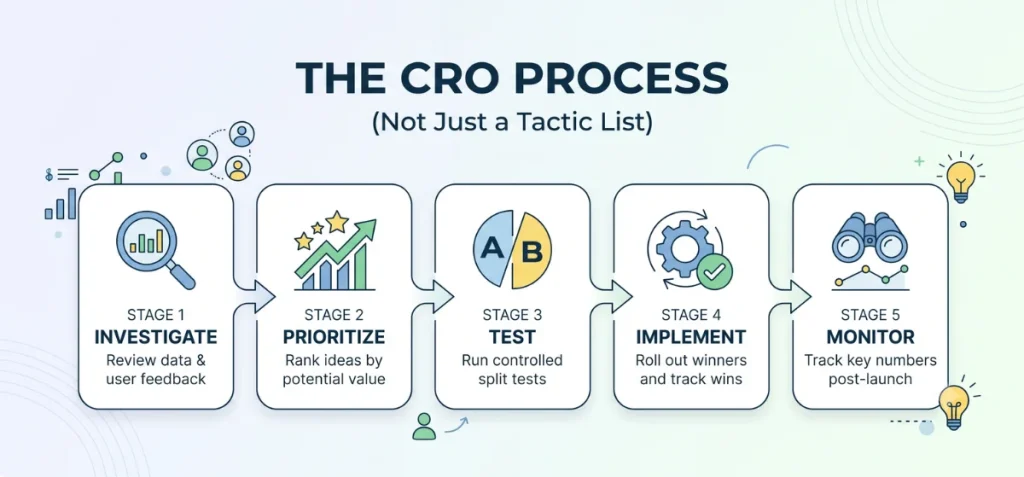
Random tactics without a proven system lead to pure guesswork. You need a structured approach to turn site traffic into real sales consistently.
Follow these five core stages for every test:
- Investigate: Review funnel drop-off points, check user session recordings, and scan customer support tickets. Find where visitors get stuck.
- Prioritize: Rank your ideas. Tackle high-impact changes before low-value updates.
- Test: Run controlled split tests with real site traffic. Compare new variations against your current design.
- Implement: Roll out the winning version across your store. Write down what changed so your team keeps track of past wins.
- Monitor: Watch key sales numbers for a few weeks post-launch. Confirm that your gains hold over time.
Prioritize Ideas With a Scoring Model
Use the PIE framework to score test ideas from 1 to 10 across three clear factors:
- Potential: Room for conversion growth on the target page.
- Importance: Amount of traffic or sales volume flowing through the page.
- Ease: Speed and technical simplicity required to ship the update.
Average your three numbers. The highest score becomes your next priority.
| CRO Idea | Potential | Importance | Ease | PIE Score |
| Add Shop Pay and Apple Pay at checkout | 7 | 8 | 9 | 8.0 |
| Rewrite top 20 SKU descriptions | 6 | 7 | 5 | 6.0 |
| Redesign homepage hero banner | 4 | 5 | 6 | 5.0 |
Alternative frameworks like ICE (Impact, Confidence, Ease) or RICE (Reach, Impact, Confidence, Effort) work equally well. Select one scoring model, stick with it, and let numbers decide your roadmap.
Micro-Conversions vs. Macro-Conversions
Macro-conversions represent your main business goal: completed sales. Micro-conversions are smaller steps along the buyer path, like add-to-carts, email signups, wishlist saves, or repeat visits within a week.
Micro-conversions happen much more frequently than final sales, so they give you fast signals during tests.
A checkout update might take three weeks to reach enough sales data, but that same test can show a clear shift in add-to-cart rates within days.
Track both metrics closely, but make sure a boost in micro-conversions leads to real sales growth before declaring a final win.
CRO for Low-Traffic Stores
Most guides tell you to test changes on thousands of visitors. The problem? Most Shopify stores simply do not get that much traffic yet.
A reliable A/B test needs at least 100 conversions per variant over two full weeks to smooth out weekly traffic swings. Without that volume, split tests return statistical noise instead of clear answers.
You can still improve your store without high traffic:
- Launch proven fixes directly without split tests. Guest checkout options, fast payment wallets, and shorter form fields work well across nearly every store.
- Collect feedback through qualitative tools. Screen recordings and quick exit surveys reveal site friction without large sample sizes.
- Watch micro-conversions as early indicators. A change that boosts add-to-cart rates in week one gives you a solid reason to keep it.
Revisit formal split tests once your store traffic scales up to validate past updates.
Fix Your Data Before You Optimize Anything
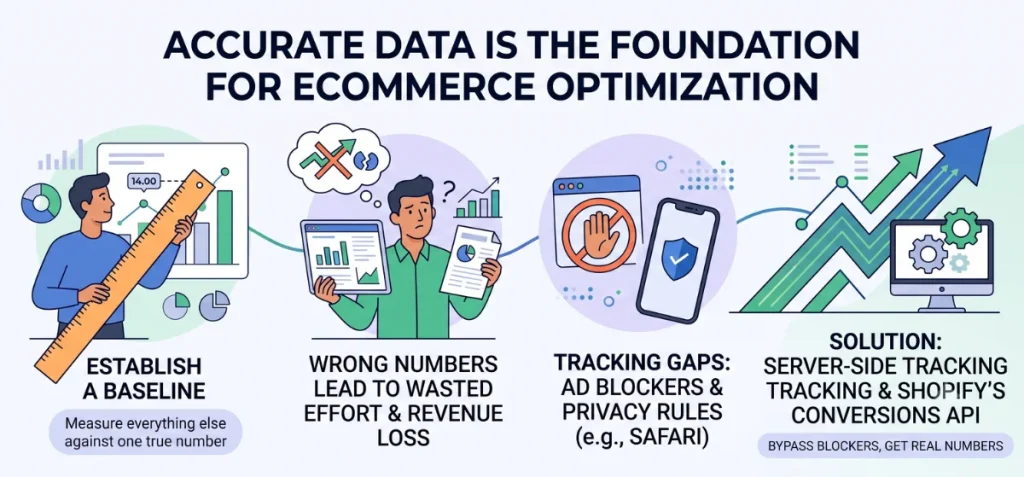
You need accurate data before you try to fix your store. Start with a baseline. It is a number you measure everything else against. If your starting number is wrong, every choice you make next will be wrong too.
Why Wrong Numbers Ruin Your Plans
Imagine your dashboard says 20 out of 1,000 visitors buy from you, but 28 people actually bought. Your starting number is wrong!
You might spend time and money trying to fix a broken page that was actually working fine all along.
Where Your Numbers Go Missing
Some tracking tools can’t detect sales because of two main reasons:
- Ad Blockers: Many internet users block tracking scripts. When these visitors buy something, some tools cannot see them.
- Privacy Rules on Phones: Safari blocks tracking cookies automatically. Since many people shop on iPhones, many sales vanish from your reports.
Your dashboard will not show an error message. It simply shows lower numbers than what you really sold.
How to Fix It
Turn on server-side tracking. Instead of relying on a buyer’s phone to report a sale, Shopify’s computer sends the sale details straight to your ad networks.
This bypasses ad blockers completely. Use Shopify’s built-in Conversions API to get your real numbers straight first.
What a Good Shopify Conversion Rate Actually Looks Like
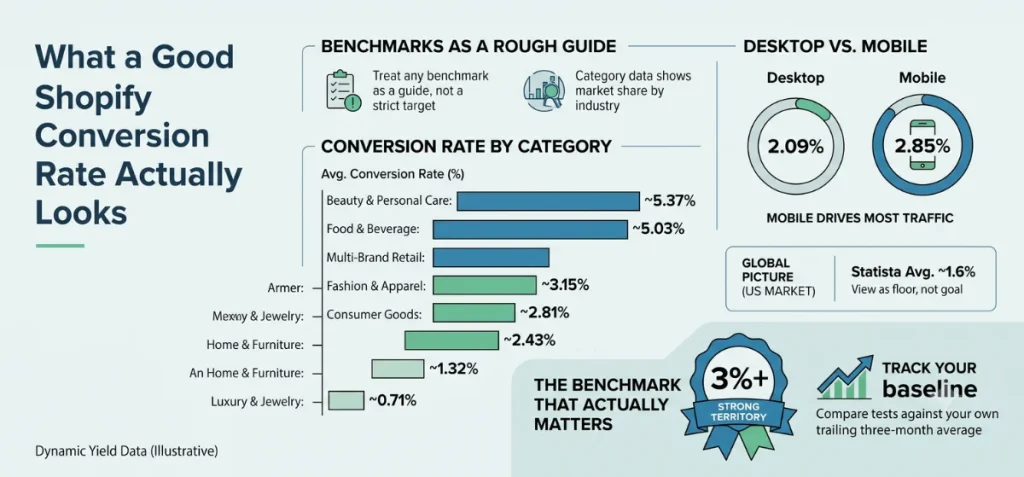
Average conversion rates change based on the data source, timeframe, and device type. Treat any benchmark as a rough guide, not a strict target.
Conversion Rate by Category
Conversion rates vary widely by industry, but the overall pattern stays consistent across different data sources.
Dynamic Yield’s benchmark dashboard tracks live ecommerce conversion data across verticals:
| Category | Avg. Conversion Rate |
| Food and Beverage | 5.03% |
| Beauty and Personal Care | 5.37% |
| Multi-Brand Retail | 3.15% |
| Fashion, Accessories, and Apparel | 2.81% |
| Consumer Goods | 2.43% |
| Home and Furniture | 1.32% |
| Luxury and Jewelry | 0.71% |
Shopify’s own compiled ecommerce data reflects almost identical numbers, usually within a fraction of a percentage point.
That consistency across two independent datasets is the useful signal here: exact numbers fluctuate over time, but the ranking between categories rarely changes.
Desktop vs. Mobile
According to the June 2026 report from Dynamic Yield, desktop users convert at 2.09%, while mobile sits close at 2.85%.
The gap seems small, but mobile brings in most store visitors today. Small tweaks to mobile checkout add up to massive revenue wins.
Cart Abandonment as Context
The Baymard Institute puts average cart abandonment at just over 70%. That number matters here because a low conversion rate and a high abandonment rate usually trace back to the same set of fixes.
The Global Picture
Zoomed out across all of ecommerce, not just Shopify, Statista places the average shopper conversion rate around 1.6% for the US market.
This number blends massive brands, tiny startups, and low-quality traffic sources into one line. View this figure as an absolute floor rather than a goal.
The Benchmark That Actually Matters
A conversion rate above 3% puts your store in strong territory. Ignore industry averages when setting targets.
Focus instead on your trailing three-month average across specific devices and traffic channels. Use category data to spot general trends, then measure every test against your own baseline.
Real Shopify CRO Examples With Numbers
Real stores prove how these changes work in practice:
| Store | What Changed | Documented Result |
| World of Books | Replatformed to Shopify | 10% conversion rate lift across all global regions |
| Everlane | Added Shop Pay at checkout | 15% US transaction increase within 30 days |
| Fabletics | Upgraded on-site search with Searchspring | 23% year-over-year revenue increase from search |
| The WOD Life | Added personalized recommendations via Nosto | 70% conversion rate increase |
World of Books proves that moving to a clean platform helps your whole site. Everlane shows how fast payment tools like Shop Pay bring in quick sales.
Fabletics proves that fixing your search bar helps people find and buy products faster. The WOD Life shows that suggesting the right products at the right moment brings huge revenue gains.
Common CRO Mistakes to Avoid
Avoid these common traps when optimizing your store:
- Full Site Redesigns. Swapping everything at once hides what actually worked or failed. Test one small change at a time.
- Multiple Test Variables. Changing headlines, photos, and button colors in a single test leaves you guessing which tweak moved the needle.
- Early Test Shutdowns. Stopping a test after three days or 40 sales gives you unreliable numbers. Wait for at least 100 sales per version over two full weeks.
- Desktop-Only Tests. Most shoppers browse on mobile phones. Always test mobile layouts first.
- Cosmetic Fixes Over Function. New fonts and colors rarely turn browsers into buyers. Fix real functional roadblocks instead, like unexpected shipping fees or long checkout forms.
30-Day Quick-Start Checklist
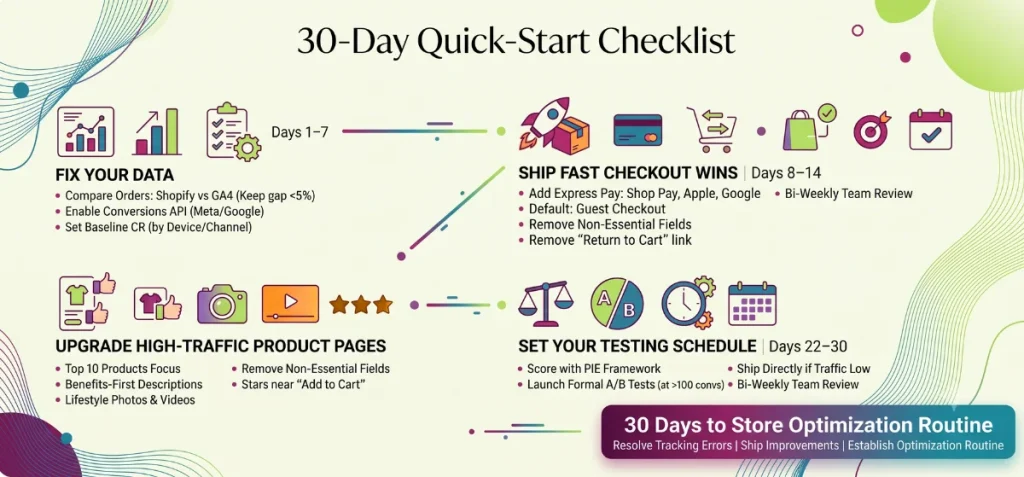
Follow this schedule in exact order. Complete each week before moving to the next.
Days 1–7: Fix Your Data
- Compare total orders in Shopify Analytics against purchase events in GA4 for the last 30 days. Gaps under 5% are normal; gaps over 20% mean tracking needs immediate attention.
- Turn on Shopify’s Conversions API for main ad channels like Meta and Google.
- Record baseline conversion rates from the last 3-month period, split by device and traffic channel.
Days 8–14: Ship Fast Checkout Wins
- Turn on missing express checkout options like Shop Pay, Apple Pay, or Google Pay.
- Default to guest checkout and move account creation requests to post-purchase screens.
- Remove non-essential fields from checkout forms, like secondary address lines or company names.
- Remove the “return to cart” link inside the checkout process.
Days 15–21: Upgrade High-Traffic Product Pages
- Find top 10 products based on total visitor traffic.
- Rewrite descriptions to emphasize clear benefits first rather than listing technical specs alone.
- Add lifestyle photos or quick video clips to pages that show plain studio shots.
- Move review star ratings directly next to “Add to Cart” buttons.
Days 22–30: Set Your Testing Schedule
- Score remaining test ideas with the PIE framework. Stick to one scoring model consistently.
- Launch a formal A/B test on your top-scored idea once site volume hits 100 conversions per variation within two weeks.
- Ship ideas directly if store traffic stays below testing thresholds. Monitor micro-conversions like add-to-cart rates for early feedback.
- Schedule a bi-weekly team review to analyze, prioritize, test, launch, and monitor site updates.
Thirty days of structured effort coverts scattered ideas into shipped site improvements, resolves background tracking errors, and establishes an ongoing optimization routine for your store.
Rounding Up
Smart Shopify CRO strategies help you sell more without spending money on new ads. You simply make your online store easier for visitors to use.
Pick one quick fix today, such as a faster checkout or clearer product photos. Small changes add up to big wins over time. Keep things simple, track your numbers, and watch your sales grow!
FAQs
What is a CRO Strategy?
A Conversion Rate Optimization (CRO) strategy is a structured plan that helps turn more site visitors into paying customers, leads, or subscribers. You boost your total sales and sign-ups without spending extra money on ads.
Is a 2.5% or 3% Conversion Rate Good for Shopify?
Indeed, a 2.5% to 3% conversion rate is a strong target for any Shopify store. Most stores average between 1.4% and 1.8%, so hitting 2.5% or higher puts your store far ahead of the competition.
How Long Does Shopify CRO Take to Show Results?
Shopify conversion rate optimization (CRO) shows quick improvements in 2 to 6 weeks. Lasting, steady growth usually takes 2 to 3 months.
Do I Need A/B Testing Tools If My Store Gets Low Traffic?
Skip A/B testing tools if your store gets low traffic. Small visitor numbers give messy, unreliable test results. Watch real session recordings, talk to buyers, and use proven fixes instead.
What’s the Difference Between CRO and SEO?
SEO brings people to your website through search results. CRO turns those visitors into paying customers. SEO grows your site traffic, while CRO grows your total sales.