

CRO Framework for Shopify: A Complete System for Conversion Optimization
A Shopify CRO framework is a structured model for improving the parts of a store that influence buying decisions, from product discovery and product pages to cart, checkout, trust, speed, and post-click experience.
A CRO framework for Shopify solves your worst profit killer: visitors who browse your shop and leave without buying. High ad spend stings when your checkout stays quiet.
Most merchants try random tweaks out of panic. They change a theme color or copy someone else, yet the sales needle never moves.
This guide outlines a five-layer diagnostic system for your store. It maps every spot where buyers drop off so you can repair the exact friction point fast.
What is a CRO Framework for Shopify?
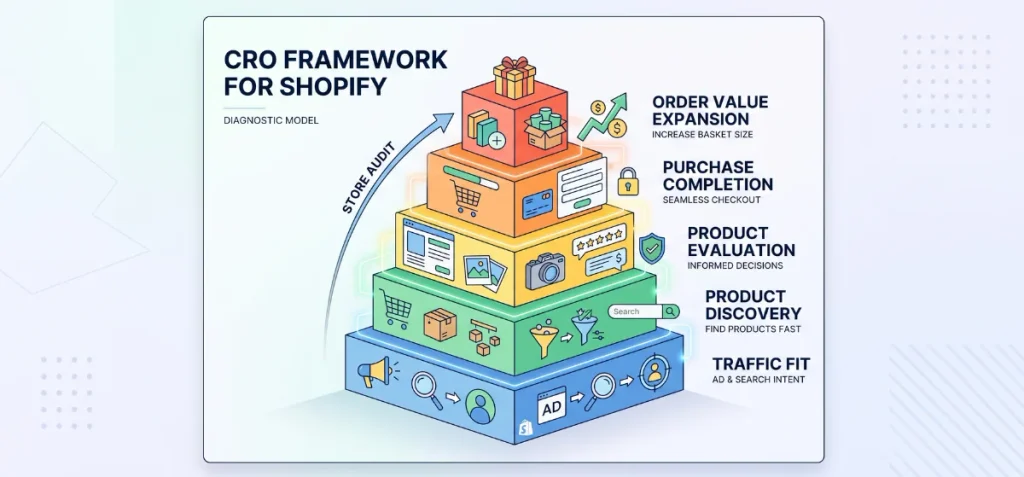
A CRO framework for Shopify is a structured diagnostic model. It audits store friction across five distinct operational layers rather than a step-by-step testing sequence.
Most guides treat optimization as a random backlog of button tweaks and banner shifts. A true diagnostic framework works differently. It maps your store as a stack of interdependent customer experiences.
Each layer relies on the integrity of the layer beneath it. If an upper layer breaks, optimizations on a lower layer fail to produce revenue.
Layer 1: Traffic Fit
This foundation answers one basic question: are the right shoppers arriving on your site?
No on-page optimization saves a store that attracts unqualified visitors. If a shopper clicks an ad for waterproof boots but lands on a summer sandal page, they bounce immediately. This layer diagnoses:
- Search intent match
- Paid ad creative and message consistency
- Traffic-source expectations
- Product-market alignment
Layer 2: Product Discovery
Once qualified traffic arrives, can shoppers find the right product quickly?
Friction here destroys sales before a customer ever sees an Add to Cart button. Shoppers leave when a catalog feels cluttered or search queries return zero results. This layer assesses:
- Main menu navigation and category hierarchy
- Collection page layouts and sorting defaults
- Filter precision for attributes like size, color, and price
- On-site search accuracy
- Product recommendations that match initial interest
Layer 3: Product Evaluation
Can shoppers confidently decide to purchase?
This layer lives on the product detail page. Shoppers need complete clarity to pull out their wallets. Ambiguity kills conversions here.
Missing details, blurry photos, or confusing options force shoppers to leave and compare elsewhere. This layer evaluates:
- High-resolution product imagery from multiple angles
- Clean variant selection setups, including visual swatches
- Clear, benefit-driven product information
- Authentic customer reviews and visual proof
- Transparent pricing, shipping timelines, and return policies
- Trust badges and quality guarantees
Layer 4: Purchase Completion
Can shoppers complete the transaction without hesitation or friction?
The purchase layer examines the bridge between cart drawer, checkout, and order confirmation. Shoppers who reach this stage want to buy.
Your only job is to get out of their way. Surprise fees or clunky forms will prompt immediate cart abandonment. This layer audits:
- Cart drawer clarity and progress bars
- Transparent shipping costs shown before the final screen
- Flexible, modern payment methods
- One-click options like Shop Pay
- Form fields stripped of unnecessary inputs
Layer 5: Order Value Expansion
Can the store increase basket size without hurting conversion rates?
Once your purchase path is clear, you look at transaction value. The goal is to raise average order value without adding hesitation to the core buying decision.
Aggressive popups distract shoppers, while relevant bundle offers help them save. This layer analyzes:
- Pre-curated bundles
- Tiered quantity breaks
- BOGO offers on complementary items
- Post-purchase upsells that do not interrupt checkout
- Strategic cross-sells on related accessories
The 5 Pillars of a Shopify CRO Framework
These five pillars form the core diagnostic engine for your store. Each pillar isolates a specific behavioral phase. Use them to diagnose where revenue leaks occur before you attempt any site changes.
1. Traffic-to-Intent Fit
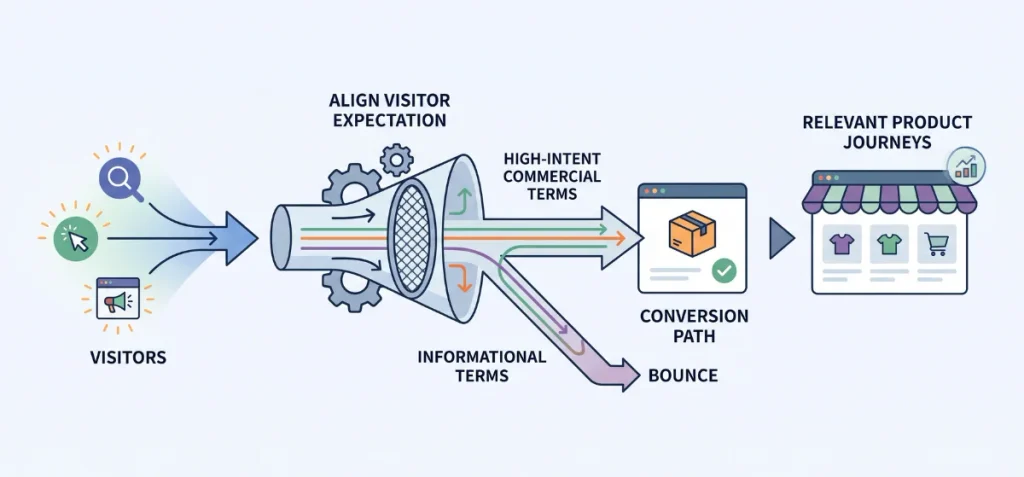
Core Question: Are visitors arriving with the right expectation?
Optimization starts long before a shopper clicks a link. You cannot fix a conversion problem on-page if you drive visitors who have zero intention to buy your specific products.
Diagnose these areas:
- Search Intent: Align product pages with high-intent commercial terms. Informational visitors looking for advice will bounce if dropped straight onto a transactional product page without context.
- Paid Traffic and Ad-Message Match: Ensure the hook, pricing, and visual promise in your ad copy match the landing page banner. Broken expectations cause immediate exits.
- Landing Page Alignment: Direct paid traffic to specific collection pages or dedicated product landing pages. Never send campaign clicks to a generic homepage.
- New vs. Returning Visitors: First-time visitors need trust signals and brand context. Returning shoppers look for fast reorder paths and clear account access.
- Device Considerations: Audit your traffic split. Mobile visitors drop off when long desktop layouts force excessive scroll depth.
- Traffic Source: Treat social traffic differently from organic search traffic. Social users browse casually. Search users arrive ready to solve a specific need.
Reviewing these baseline touchpoints is a foundational step in your broader Shopify CRO strategies.
2. Product Discovery
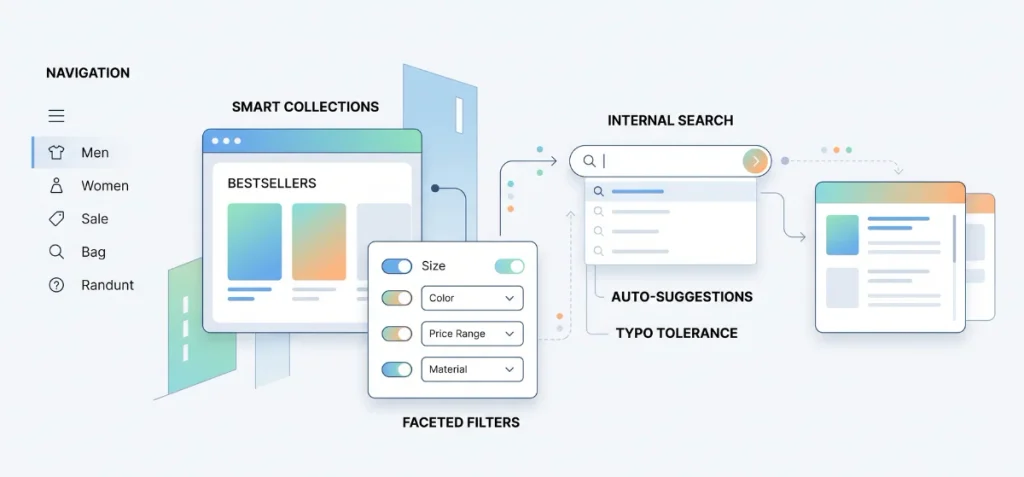
Core Question: Can visitors quickly find a product worth buying?
Shoppers cannot buy products they cannot find. Standard conversion advice often skips discovery to talk about button colors, but discovery friction ends the shopping session early.
Diagnose these areas:
- Navigation: Organize your main menu around user intent. Limit top-level categories to avoid decision fatigue.
- Category Structure: Build logical parent-child relationships. A customer shopping for outerwear should reach lightweight jackets within two clicks.
- Collections: Use smart sorting defaults. Display bestsellers first to validate customer interest.
- Filters: Provide faceted filters for sizes, colors, materials, and price. Zero-state results frustrate shoppers; disable filter combinations that yield no stock.
- Internal Search: Implement auto-suggestions and typo tolerance. Shoppers who use site search convert at much higher rates, provided your search bar returns accurate items.
- Merchandising: Place seasonal items and promotional collections where eye tracking naturally lands on desktop and mobile.
- Product Recommendations: Present related items on collection pages to expose catalog depth without clutter.
3. Product Decision Experience
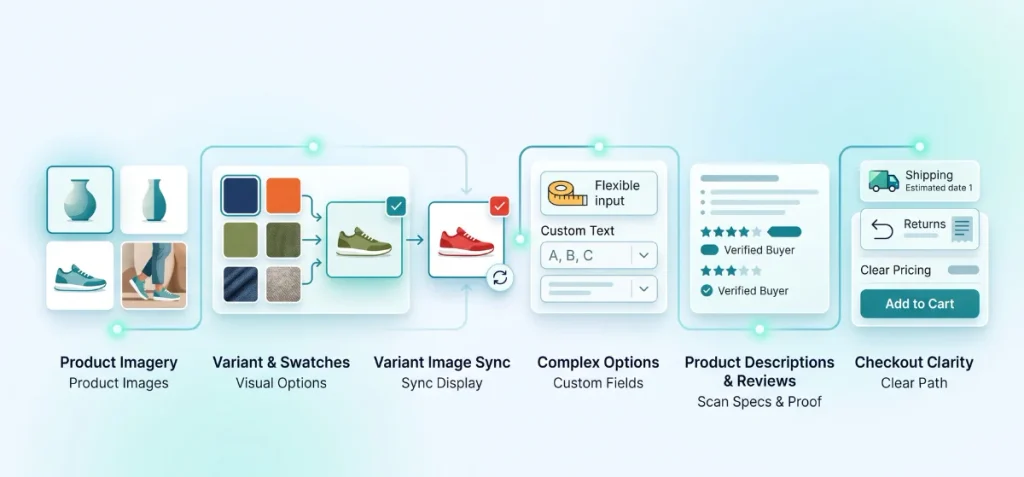
Core Question: Can shoppers confidently decide to buy?
This is the largest pillar of the entire framework. Your product detail page (PDP) must answer every functional question a buyer holds. Any doubt causes the visitor to tab away.
Diagnose these areas:
- Product Imagery: Display crisp photos from multiple angles, in-context lifestyle shots, and clear scale references.
- Variant UX and Swatches: Dropdown menus create friction when a product features multiple shades or materials. Shoppers want to see exact colors instantly.
You can add color swatches to make these selections visual. For apparel and lifestyle catalogs, use automatic variant-image swatches to show real fabric textures directly on the selector. - Variant Image Sync: When a user selects a red shirt, your main gallery must update immediately to show the red shirt.
Tools like Echo Swatch (available on the Shopify App Store) solve this by organizing variant media.
You can configure your theme to display only selected variant images so customers do not have to sift through unrelated photos.
You can also adjust your layout with dedicated variant-image galleries and customize your swatch size for optimal mobile tap targets. - Complex Options: Stores selling items with custom text, measurements, or materials require flexible input fields.
Pick the right setup using custom product options or specialized product options apps.
If your catalog has distinct attributes across categories, learn how to add different variant sizes and flavors cleanly, or install dedicated variant-size apps. - Product Descriptions: Write short, punchy, benefit-driven copy. Use bullet points for materials, dimensions, and care instructions so shoppers can scan key specs in seconds.
- Social Proof and Reviews: Feature user-generated photos and verified buyer badges directly below the price and variant selector.
- Pricing and Availability: Display final pricing clearly. State inventory levels if stock runs low to reduce indecision.
- Shipping Information and Returns: Place estimated delivery dates and a plain-English return summary right beside the primary call to action.
- CTA Clarity: Make the primary button unmistakable. Stick to simple text like “Add to Cart” and lock it above the fold on mobile screens.
If you want a broader overview of the software ecosystem for this phase, see our roundup of Shopify apps that help with CRO.
4. Checkout Confidence
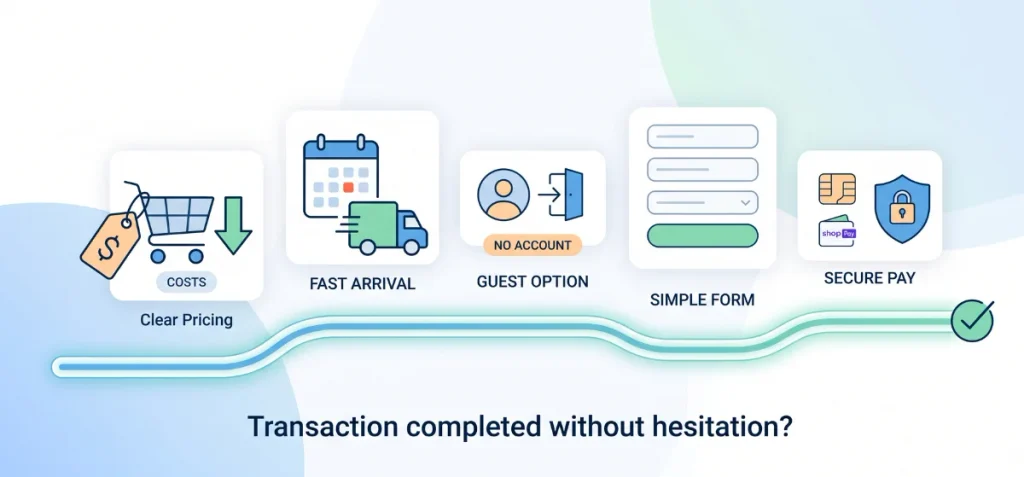
Core Question: Can shoppers complete the transaction without hesitation?
Cart abandonment happens when friction interrupts purchase momentum. According to extensive usability studies by the Baymard Institute, unexpected extra costs like shipping fees, complicated checkout processes, and site trust concerns drive over 48% of cart drop-offs.
Diagnose these areas:
- Shipping Cost Transparency: Show realistic shipping fees in the cart drawer. Hidden charges at the final checkout step cause immediate bounce rates.
- Delivery Expectations: Display exact arrival date ranges instead of vague transit times like “3-5 business days.”
- Guest Checkout: Never force shoppers to create an account before buying. Provide a frictionless guest option as the primary path.
- Checkout Simplicity: Remove distractions, navigation menus, and unnecessary form fields from the checkout screen. Keep the customer focused entirely on completing the transaction fields.
- Payment Options: Provide trusted payment gateways. Digital wallets remove friction by auto-filling addresses and billing details.
- Shop Pay: Integrate accelerated checkout buttons. Data from Shopify demonstrates that Shop Pay lifts conversion rates significantly by letting returning shoppers check out with a single tap.
- Trust Signals: Place secure payment badges, encryption icons, and direct customer support links near checkout inputs.
5. Offer & Average Order Value
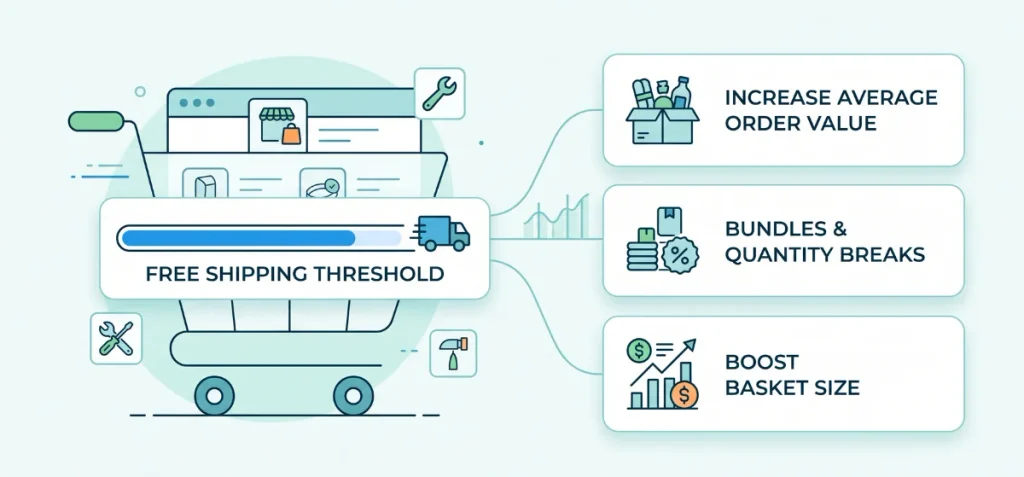
Core Question: Can the store increase basket size without hurting conversion?
High conversion rates mean little if your average order value fails to cover customer acquisition costs.
Do not immediately try to push more paid traffic when revenue numbers stall. Audit your offer structure first.
Diagnose these areas:
- Bundles: Offer logical product pairings that solve a complete customer problem.
Use a dedicated tool like Echo Bundle (get it on the Shopify App Store) to build attractive multi-item packages.
If you want to review market options, evaluate the best custom product bundle apps or test a flexible bundle builder. - Tiered Quantity Breaks: Encourage multi-unit purchases with progressive discounts on high-consumption goods.
Implement the best quantity breaks apps to show buyers how much they save when buying two or three units.
- Volume Discounts: Reward wholesale or bulk purchasers with clear, dynamic price tables using a proven volume discount app.
- BOGO Offers: Clear older inventory and reward shoppers using Buy One, Get One incentives via reliable BOGO apps.
- Free-Shipping Thresholds: Set your free shipping threshold 15% to 20% above your current average order value.
Display a real-time progress bar in the cart drawer to encourage that final basket addition.
Shopify CRO Framework vs CRO Strategy vs CRO Testing Roadmap
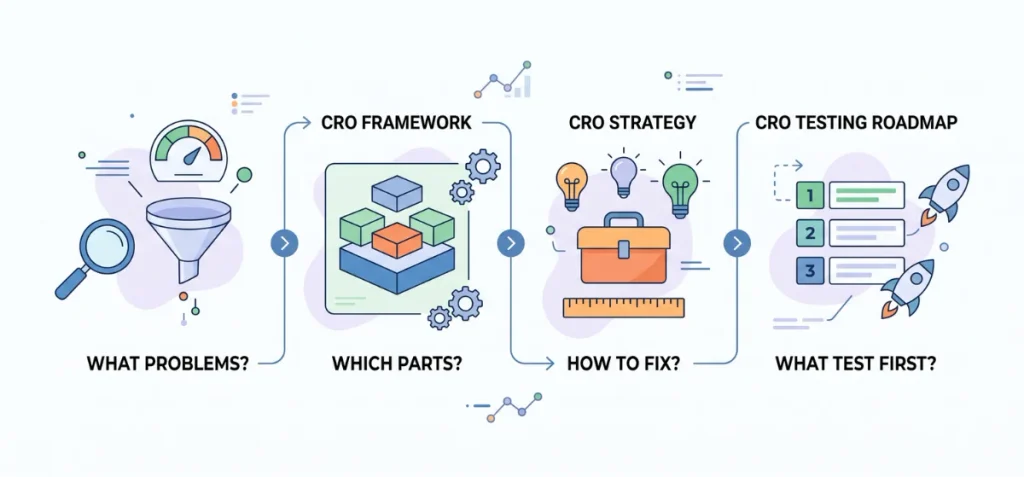
Store owners often mix up these four terms. That mistake wastes money and confuses. Each term answers a different question:
| Concept | Main Question | Simple Purpose |
| CRO Audit | What problems exist right now? | Finds broken buttons, slow pages, and drop-off points. |
| CRO Framework | What parts of the store do I fix? | Sorts your shop into five clear layers. |
| CRO Strategy | How do I fix those parts? | Picks the right solution for each problem. |
| CRO Testing Roadmap | What do I test first? | Puts your test ideas in order of priority. |
Start with a CRO audit. The audit spots the exact place where visitors leave your store.
Then check your CRO framework. The framework tells you which layer failed: traffic, discovery, product page, checkout, or order value.
After that, pick your Shopify CRO strategies. These tactics give you fixes like clean swatches or better filters.
Finally, build your testing roadmap. The roadmap helps you test one simple change at a time.
How to Use the Framework on a Shopify Store
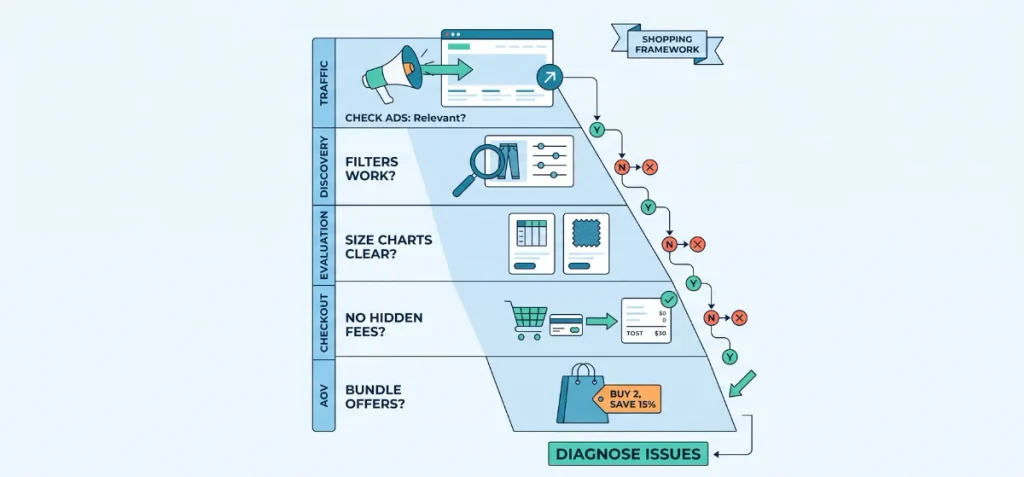
Here is how you use this framework in real life.
Imagine you run an online clothing store. You check your numbers and see plenty of visitors on your product pages, but almost nobody buys.
Do not guess. Walk down the diagnostic layers one by one:
- Traffic: Is the traffic relevant? Check your ads. If your ad shows a heavy winter coat but clicks land on light summer jackets, visitors leave right away.
- Discovery: Can shoppers find the right product? Check your filters. If visitors cannot sort by their exact size, they quit the search.
- Evaluation: Are size, color, imagery, reviews, and product details clear? Check the page layout. If buyers cannot see real fabric swatches or size charts, they do not feel safe to buy.
- Checkout: Is there unnecessary purchase friction? Check the cart. If unexpected shipping fees appear on the final screen, shoppers abandon the purchase.
- AOV: Is there a relevant bundle or quantity offer? Check the basket size. If people buy only one item, offer a two-pack discount to raise your order value.
Stop right there. This process shows you the exact layer with the issue so you know what to fix first.
Shopify CRO Framework Checklist
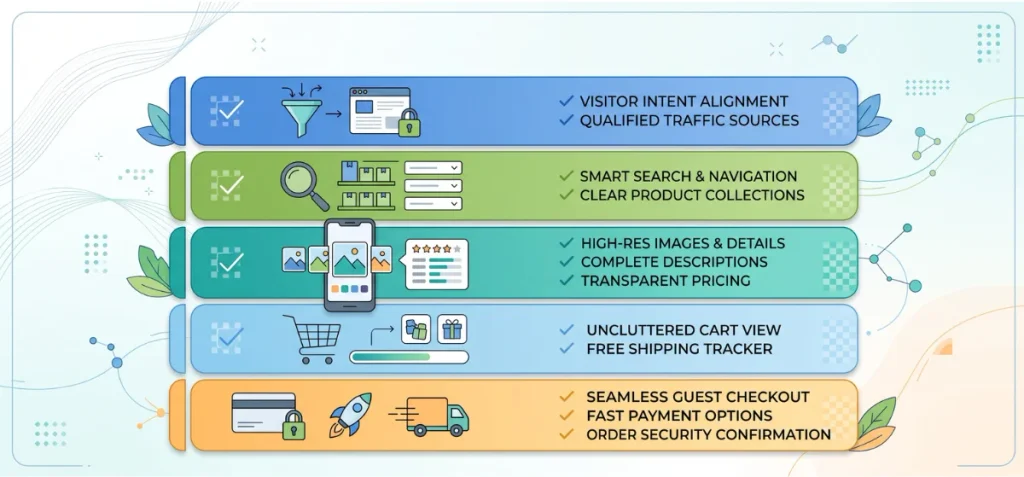
Use this quick checklist to inspect each layer of your store. Check off each item to spot your weakest points.
Traffic Layer
- Visitor intent matches your page content
- Ad copy and photos match landing page offers
- Traffic sources bring interested, qualified buyers
- Mobile visitors see fast, responsive pages
Discovery Layer
- The main menu shows clear, simple categories
- Site search delivers accurate product results
- Collections sort bestsellers to the top
- Filters let shoppers sort by size, color, and price
Product Page Layer
- Photos show high-resolution details from multiple angles
- Swatches display clear variant colors and textures
- Descriptions state clear dimensions, materials, and benefits
- Real customer reviews display with buyer photos
- Prices and stock levels appear clearly
- Shipping costs and return rules show near the button
- The Add to Cart button stays visible and easy to tap
Cart Layer
- The cart drawer shows full price totals without surprise fees
- The free shipping progress bar shows the needed spend
- One-click bundle offers appear naturally
- Edit buttons let shoppers update counts easily
Checkout Layer
- Guest checkout stays open as the default option
- Fast payment buttons like Shop Pay appear at the top
- Form fields ask only for vital order details
- Security badges and lock icons confirm safety
- Delivery dates show exact arrival times
Order Value Layer
- Bundles package matching products together
- Quantity breaks reward shoppers who buy more units
- BOGO deals clear seasonal stock fast
- Cross-sells suggest helpful accessories at the right time
Wrapping Up
A CRO framework for Shopify gives you a clear map to fix lost sales. Its core attribute is structured problem detection across five simple store layers. Its direct value is higher profit without extra ad spend.
Test each layer one by one. Check your traffic, product pages, and checkout path today. You’ll find your store leaks fast and convert more clicks into happy buyers.
FAQs
How Do I Start CRO on Shopify?
Open Shopify Analytics first. Find your biggest funnel leak, like a high cart drop-off rate, and fix that specific spot before anything else.
What Are the Main Steps in a Shopify CRO Process?
Follow this simple loop: Measure numbers, diagnose the leak, prioritize the fix, apply changes, test results, and learn from buyer reactions.
What is CRO vs CRM?
CRO turns store visitors into buyers on your site. CRM manages customer records, emails, and repeat relationships after they buy.