

CRO Testing Roadmap Shopify: 5 Steps to Improve Conversions
A CRO testing roadmap Shopify stores use is a five-stage system: audit funnel drop-offs, fix obvious bugs, prioritize ideas with ICE scoring, run controlled experiments, and track revenue per session to grow profits.
Many store owners waste money on traffic that never buys. Visitors land on your product pages, look around for five seconds, and leave without a trace. You tweak button colors, but your bank account stays flat.
Random changes create confusion instead of sales. You can’t guess your way to a higher conversion rate. A solid CRO testing roadmap that Shopify brands rely on eliminates this guesswork.
This guide gives you a simple, five-step testing plan. You’ll learn how to audit your funnel, rank high-impact tests, and protect your profit margins.
What is a Shopify CRO Testing Roadmap?
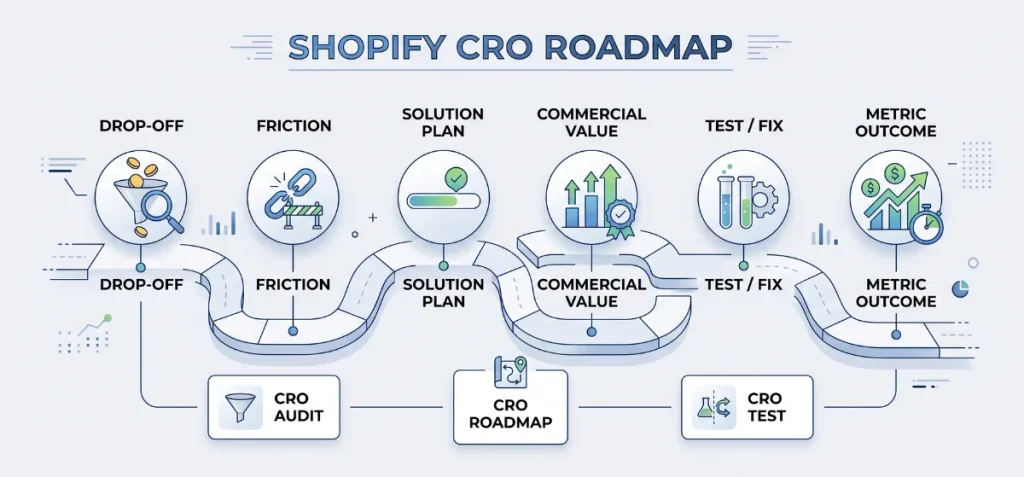
A Shopify CRO testing roadmap isn’t a random site redesign checklist. It isn’t a haphazard list of button color tests.
A true roadmap functions as a step-by-step operating plan. It directs your team on what store elements to fix, test, and launch over time to grow sales.
Instead of guesses, a proven roadmap connects each customer leak to clear business execution:
| Step | Function | Merchant Example |
| Evidence | Find the drop-off point | Mobile users leave at the cart drawer. |
| Problem | Identify the friction | Extra shipping costs surprise shoppers. |
| Hypothesis | Plan the solution | Free shipping bars keep users in the checkout flow. |
| Priority | Rank commercial value | High priority due to lost mobile sales. |
| Test / Fix | Take action | Show a dynamic free shipping progress bar. |
| Metric | Track the outcome | Checkout start rate and revenue per session. |
Official merchant training from the Shopify Academy teaches store owners to audit bottlenecks before launching changes.
Optimization frameworks from agencies like Webspirit reinforce this method. Successful roadmaps turn raw analytics into structured, revenue-driven experiments rather than subjective guesses.
Keep three separate concepts clear:
- CRO Audit: Finds where shoppers get stuck.
- CRO Roadmap: Decides which fixes or tests happen next.
- CRO Test: Proves whether your change increases store revenue.
Explore These 5 CRO Stages to Boost Conversions
These five stages take you from raw store numbers to consistent sales gains.
Stage 1 — Establish Your Shopify CRO Baseline
You cannot improve numbers you do not track. First, measure your store performance before you change a single pixel or install an app.
This baseline gives you a clean benchmark to judge future wins and losses.
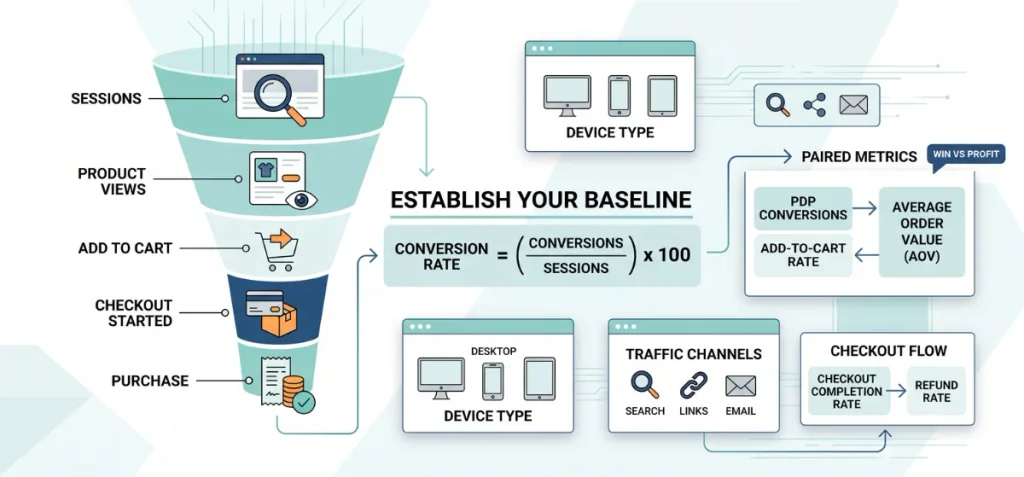
Track the Funnel
Overall conversion rate hides critical leaks. A store can show a decent 2.5% conversion rate while losing thousands of dollars at the cart page. Track the whole path:
Sessions → Product Views → Add to Cart → Checkout Started → Purchase
Calculate your baseline rate with this standard formula:
Conversion Rate = (Conversions / Sessions) x 100
CRO guides from Wisepops suggest tracking this formula across each device and traffic channel. This practice pinpoints the exact point where buyers give up.
Segment Your Data
Broad averages lie. Segment your traffic into clean buckets to spot true customer behavior:
- Device Type: Compare mobile buyers against desktop buyers.
- Traffic Channels: Separate organic search, paid social ads, and email campaigns.
- Visitor History: Track first-time visitors versus returning buyers.
- Top Landing Pages: Check which collection and product pages receive the most visits.
- Product Types: Group high-margin items separately from low-cost impulse goods.
Choose Primary and Guardrail Metrics
Single metrics lead to poor business choices. You might double your add-to-cart clicks, yet your average order value drops through the floor.
A true testing roadmap uses paired metrics. Your primary metric tracks the win, while your guardrail metric protects store profits.
| Store Goal | Primary Metric | Guardrail Metric |
| Increase PDP conversions | Add-to-cart rate | Average Order Value (AOV) |
| Improve checkout flow | Checkout completion rate | Refund rate |
| Increase order value | Revenue per session | Baseline conversion rate |
| Improve store offers | Revenue per session | Gross profit margin |
Research from the Shopify CRO Report warns against chasing vanity clicks. Track bottom-line revenue per session instead.
Apply proven Shopify CRO strategies to protect your margins. Before you launch experiments, review what Shopify apps help with CRO so you do not bloat your theme code.
Stage 2 — Find the Biggest Conversion Leak
Great roadmaps start with accurate diagnosis. You save weeks of effort when you fix your largest drop-off point first.
Find where most visitors slip away before you write your first test plan.
Compare Each Funnel Transition
Look at the jump between each funnel step. A sudden plunge flags a specific UX defect. Use this quick symptom guide to spot the trouble:
| Symptom | What to Investigate |
| High views, low add-to-cart (ATC) | Product clarity, variant swatches, missing images, unclear pricing, lack of trust badges |
| High ATC, low checkout start | Cart drawer friction, unexpected shipping fees, vague delivery dates, confusing discount fields |
| High checkout start, low purchase | Limited payment methods, required account creation, hidden taxes, clunky form fields |
| Mobile conversions lag behind desktop | Slow page speed, missing sticky ATC button, tiny tap targets, jumpy layout shifts |
| Search traffic converts poorly. | Broken search relevance, weak filters, mismatch between search intent and landing copy |
Combine Quantitative and Qualitative Data
Numbers show the leak, but user actions explain the cause. Pair hard metrics with customer behavior to discover real friction points.
Optimization guidance in the official Shopify Conversion Rate Optimization Guide advises merchants to balance numbers with real session evidence:
- Shopify Analytics and GA4: Pinpoint where visitors leave your store.
- Heatmaps and session replays: Reveal what visitors do, click, or ignore on screen.
- Customer surveys and support tickets: Explain why buyers hesitate, doubt, or abandon purchases.
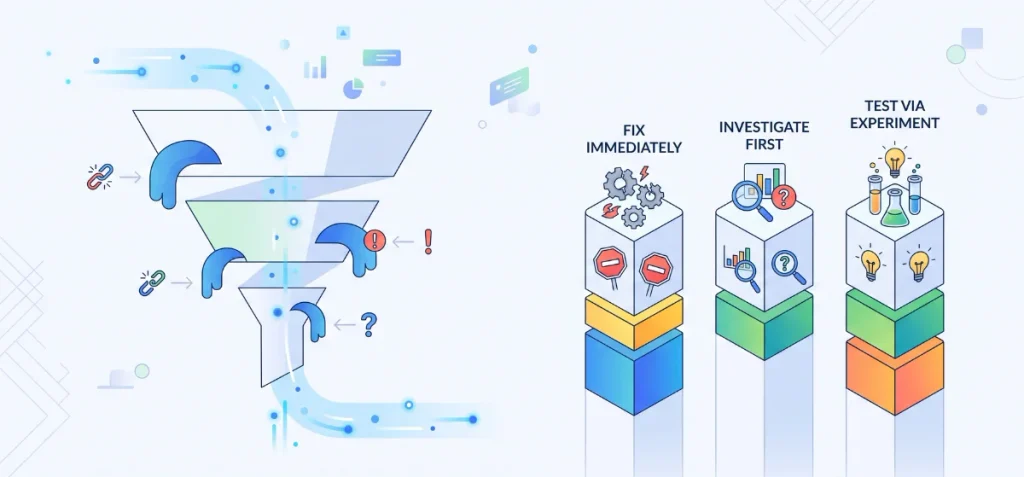
Fix Obvious Problems Before Testing
Never waste testing traffic on clear bugs. A broken button is not an experiment; it is lost revenue. Sort every issue into three distinct buckets:
Fix Immediately: Broken checkout buttons, missing mobile menus, 404 links, incorrect variant images, and tracking errors.
Investigate First: Sudden drop in checkout completion, huge mobile gaps, or high cart abandonments with zero user feedback.
Test via Experiment: New offer structures, variant presentation styles, CTA button copy, and trust badge placements.
Stage 3 — Turn Problems into CRO Hypotheses
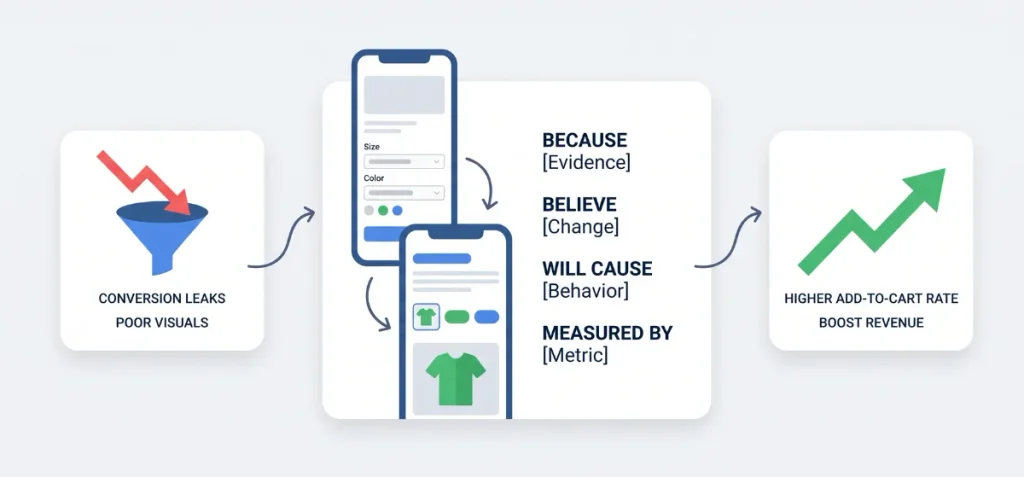
Never run an experiment based on a gut feeling. Random changes waste weeks of valuable traffic. Turn every funnel leak into a structured test hypothesis using this proven formula:
Because [observed evidence], I believe [specific change] will cause [buyer behavior], measured by [primary metric].
Here is a live example from a mobile store audit:
Because mobile product pages have a high view-to-cart drop-off, I believe replacing text dropdowns with visual color swatches and matched photos will reduce choice friction, measured by an increase in mobile add-to-cart rate.
Solve Product Page Variant Friction
Catalog confusion kills sales faster than high prices. Standard Shopify text dropdowns force shoppers to guess how an item looks.
Cluttered image galleries make matters worse. When a buyer picks “Navy Blue,” the gallery still displays red, green, and black shirts. Shoppers leave when they can’t confirm their choice.
Clean up visual selection directly on the product page. You can follow tutorials on how to show only selected variant images or read guides on how to add swatches based on variant image automatically in Shopify.
For complex products, master how to add different variant sizes and flavors in Shopify and learn how to change size of swatch product images in Shopify.
If you need a dedicated app, review our curated lists for the best Shopify color swatch apps, the best variant size Shopify apps, and the best Shopify variant image gallery apps.
For a fast, code-free fix, test Echo Swatch. You can install Echo Swatch straight from the Shopify App Store.
The app filters out unrelated photos, displays custom color pills, and assigns images automatically without slowing down your theme.
Stage 4 — Prioritize Your Shopify CRO Test Backlog
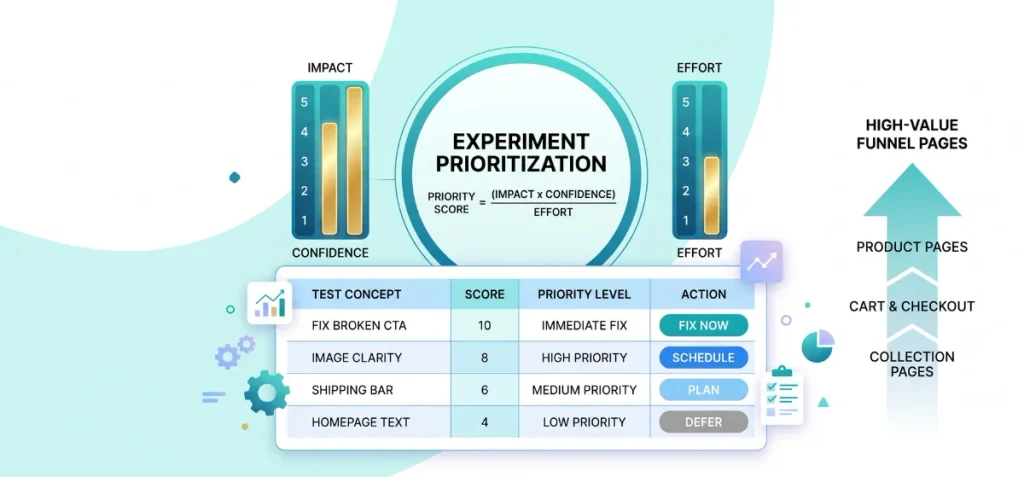
Store traffic is finite. You can’t test fifty ideas at once without stalling your business. Prioritization separates profitable testing programs from endless busywork.
Rank every hypothesis with a structured scoring formula before touching your theme code.
Score Experiments with an Objective Formula
Avoid guessing what matters most. Use a simple ICE framework to calculate an objective score for each test idea:
Priority Score = (Impact x Confidence) / Effort
- Impact (1 to 5): How much will this test lift bottom-line sales?
- Confidence (1 to 5): Does customer data or session replay evidence back this idea?
- Effort (1 to 5): How many development hours or app configurations does it require? (Higher numbers equal harder work).
Other agencies rely on different models. For instance, Blend Commerce uses its PECTI framework: Proof, Ease, Cost, Time to Impact, and Impact. Choose the model your team understands best.
Use this working prioritization table to organize your backlog:
| Test Concept | Priority & ICE Score |
| Fix broken mobile CTA | Immediate Fix (Impact: 5, Confidence: 5, Effort: 1) |
| Variant image clarity | High Priority (Impact: 4, Confidence: 4, Effort: 2) |
| Free shipping threshold bar | High Priority (Impact: 4, Confidence: 3, Effort: 2) |
| Homepage headline rewrite | Medium Priority (Impact: 2, Confidence: 2, Effort: 1) |
| Full store redesign | Low Priority (Impact: 5, Confidence: 2, Effort: 5) |
Focus on High-Value Funnel Pages
Never start testing on the homepage. Most visitors land deep on product and collection pages from ads or organic search. Direct your testing resources close to the money:
Product Pages → Cart Drawer → Checkout → Collection / Search → Homepage → Policy Pages
Keep one rule in mind: real data overrides theoretical order. The CRO team emphasizes that the largest validated funnel drop must always dictate your starting point.
If your cart-to-checkout drop is twice as large as your view-to-cart drop, tackle the cart first.
Stage 5 — Run, Measure, and Roll Out the Test
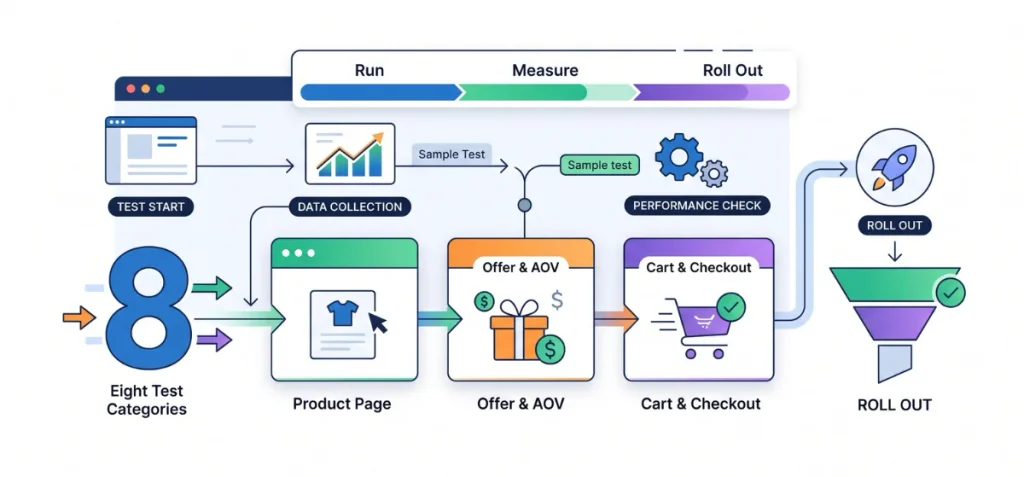
You do not need a list of fifty random tricks. Long lists only create confusion. Focus on eight high-value test categories split across three core funnel areas.
Product Page Tests
Product pages do the heavy lifting. Visitors land here to judge your product, price, and trustworthiness.
- Variant dropdowns to visual swatches: Text dropdowns hide your options. Test visual color buttons and size tiles to make selection fast.
- Filter variant images: When a user picks red, hide the green and black shirts. Show only the exact photos for that picked item.
- Move trust details near the buy button: Place fast shipping badges and money-back icons right next to your Add to Cart button.
- Improve product image order: Put short video clips and real customer photos right after your hero shot.
Offer and AOV Tests
Sometimes buyers want your items, but your order values remain too low. When shoppers buy only one unit, run offer tests instead of basic design tweaks.
- Quantity-break offers: Give discounts when buyers purchase two, three, or four items together.
- Product bundles: Pair related items as a single discounted pack to raise cart values.
- Free shipping thresholds: Place a dynamic progress bar in the cart drawer to encourage one more purchase.
You can set up these offers without custom theme code. Read our complete guide on how to show automatic discount on product page in Shopify.
Compare options with our lists of the best Shopify apps for custom product bundles, the best Shopify bundle builder apps, and the best Shopify product options apps.
For volume deals, check out our guides on the best quantity breaks Shopify app, the best volume discount app for Shopify, and the best BOGO Shopify apps.
Look at Echo Bundle for a clean, code-free setup. You can find the Echo Bundle on the Shopify App Store.
The app lets you build tiered discounts, mix-and-match packages, volume breaks, and gift incentives to boost order sizes immediately.
Cart and Checkout Tests
Do not lose buyers at the finish line. Remove friction before they reach the payment screen.
- Add cart reassurance: Display clear return policies and secure payment icons inside the cart drawer.
- Highlight fast checkout options: Feature one-click checkout buttons like Shop Pay high on the cart screen.
Shopify CRO Tests to Put on Your Roadmap
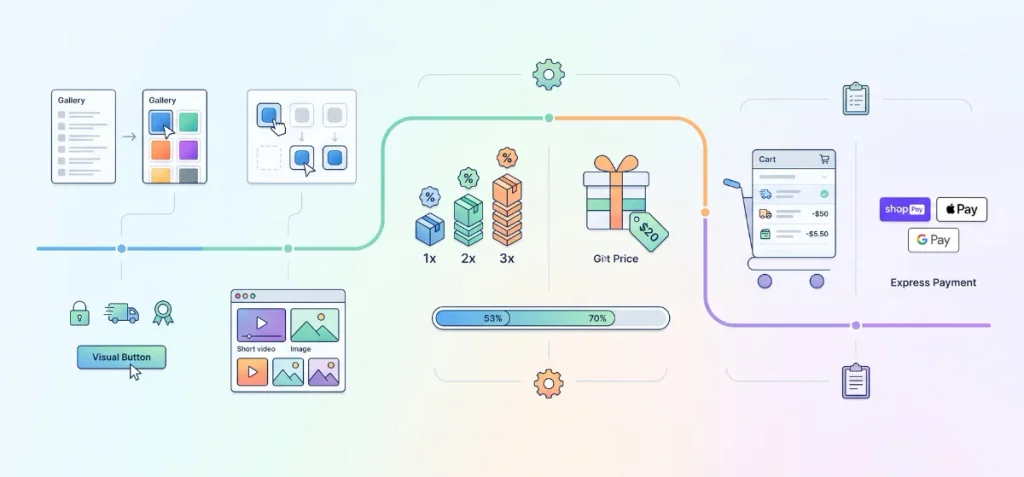
You do not need thirty random ideas on your board. Giant lists only scatter your focus. Put your energy into eight high-impact test categories grouped across three core funnel bottlenecks.
Product-Page Tests
Product pages carry the hardest job in your store. Shoppers study details here to confirm quality, sizing, and price.
- Variant dropdown to visual swatch: Text menus force shoppers to guess colors and patterns. Replace old dropdown menus with clickable swatch tiles to speed up decisions.
- Show only selected variant images: A customer clicks red, but your gallery still shows five green photos. Hide unrelated pictures so buyers see only their chosen style.
- Move trust and shipping notices near the buy button: Place free delivery notices, clear return windows, and secure checkout badges right beneath your Add to Cart button.
- Improve product-media hierarchy: Put short video demos and real user photos ahead of repetitive angle shots.
Offer and AOV Tests
Sometimes the problem is not that people refuse to buy. The real issue is that people buy only one item.
In that situation, test an offer that increases basket value rather than trying to increase raw conversion rate.
- Quantity-break offers: Reward shoppers with bigger savings when they buy two, three, or four units of the same item.
- Bundle or mix-and-match offers: Package complementary items together at a combined discount, so shoppers solve an entire problem at once.
- Free-shipping threshold: Add an active progress bar inside the cart drawer to encourage one more small add-on item.
Set up these promotional tiers without writing custom code. Read our step-by-step walkthrough on how to show automatic discount on product page in Shopify.
Compare store setups with our roundups of the best Shopify apps for custom product bundles, the best Shopify bundle builder apps, and the best Shopify product options apps.
For tiered pricing strategies, review our guides on the best quantity breaks Shopify app, the best volume discount app for Shopify, and the best BOGO Shopify apps.
Test the Echo Bundle to launch these offers quickly. Add the Echo Bundle from the Shopify App Store directly to your store.
The app handles bundles, BOGO deals, volume breaks, quantity discounts, free gifts, and shipping goals without theme conflicts.
Cart and Checkout Tests
Do not let ready buyers walk away at the final hurdle.
- Cart reassurance, shipping clarity, and accelerated checkout: State total delivery costs early inside the cart drawer. Add Shop Pay buttons right at the top so buyers check out in seconds.
Shopify CRO Roadmap Example: 30 Days
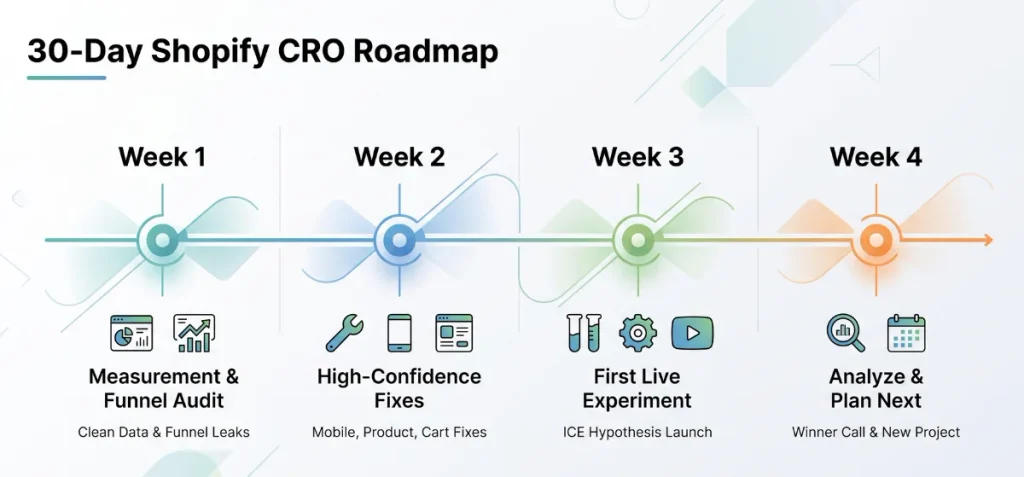
Action beats theory every time. A clear calendar keeps your optimization work on track and prevents scope creep.
Here’s a practical four-week sequence you can run this month:
| Week | Core Focus | Deliverable Output |
| Week 1 | Measurement and funnel audit. | Clean data tracking plus your top three funnel leaks. |
| Week 2 | High-confidence fixes. | Solved layout bugs on mobile, product pages, and cart. |
| Week 3 | First live experiment. | Launch your highest-scoring ICE hypothesis. |
| Week 4 | Analyze and plan next test. | Winner or loser call plus your next roadmap project. |
Shopify CRO Roadmap by Store Type
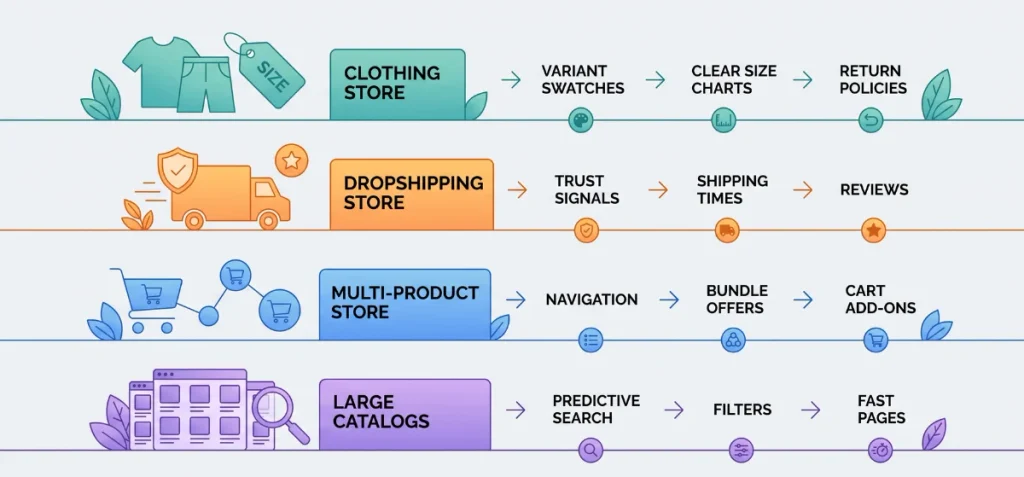
Different store models run into unique buyer roadblocks. Match your roadmap priorities directly to your catalog setup.
Fashion and Apparel
Fit confusion stops clothing buyers in their tracks.
- Priority Path: Visual variant swatches → matched photos → clear size charts → return policy guarantees.
- Pick the right tools with our roundups of the best Shopify apps for clothing stores and the best variant size Shopify apps.
Dropshipping
Skepticism remains your biggest sales hurdle here.
- Priority Path: Product authenticity → upfront shipping times → realistic delivery dates → customer reviews → bundle offers.
- Protect your funnel with our guide on essential Shopify apps for dropshipping.
Multi-Product Stores
Shoppers often leave after picking up a single item.
- Priority Path: On-site search → easy collection navigation → discounted bundles → cart drawer add-ons.
- Build custom configurations with the best custom product options Shopify app and the best Shopify product options apps.
Large Catalogs
Deep inventories overwhelm casual mobile visitors.
- Priority Path: Predictive search → faceted filters → variant speed → page load stability → automated merchandising.
Shopify CRO Performance Checks You Should Never Skip
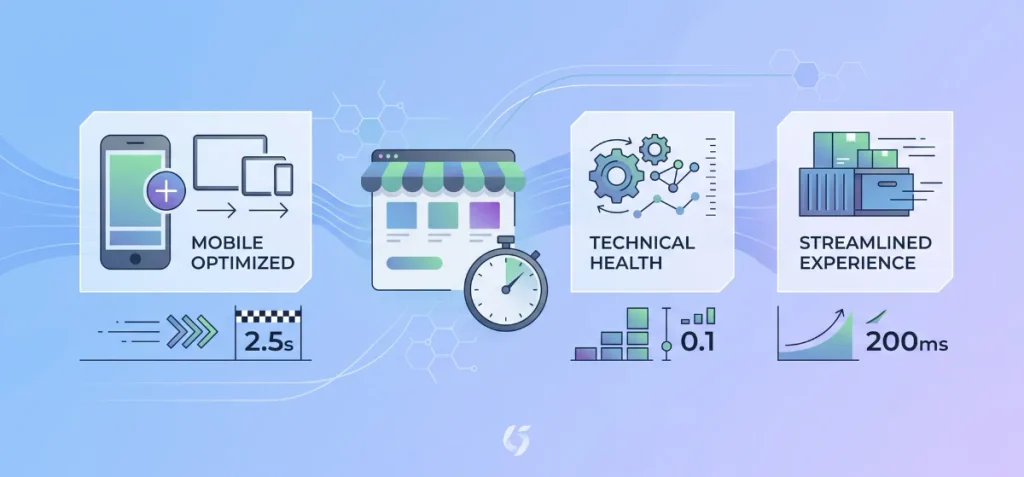
A slow website destroys conversions before buyers even see your offers. Visual polish means nothing if your product page takes five seconds to load. Always audit technical performance before and after every split test.
Focus your technical checks on these six danger zones:
- Mobile responsiveness: Test buttons and menus on real smartphones, not just desktop browser emulators.
- Core Web Vitals: Audit your metrics against official benchmarks.
- App script bloat: Remove orphan JavaScript from deleted apps.
- Uncompressed product media: Compress oversized PNG files and long videos.
- Theme and app conflicts: Check whether multiple scripts fight for control of your cart drawer.
- Layout shifts: Ensure banners do not push content down while the page renders.
Follow current standards from Google. Official documentation on Google Web.dev Core Web Vitals defines these good targets at the 75th percentile of user visits:
- Largest Contentful Paint (LCP): 2.5 seconds or faster
- Interaction to Next Paint (INP): 200 milliseconds or faster
- Cumulative Layout Shift (CLS): 0.1 or lower
The Shopify Help Center on Web Performance cautions that installed apps, theme code, analytics tags, and heavy media directly affect storefront speed.
Remember this vital principle: a CRO app is useful only when its conversion value outweighs the speed and usability costs it introduces. Keep your store light, fast, and stable.
How Checkout Fits into a Shopify CRO Roadmap
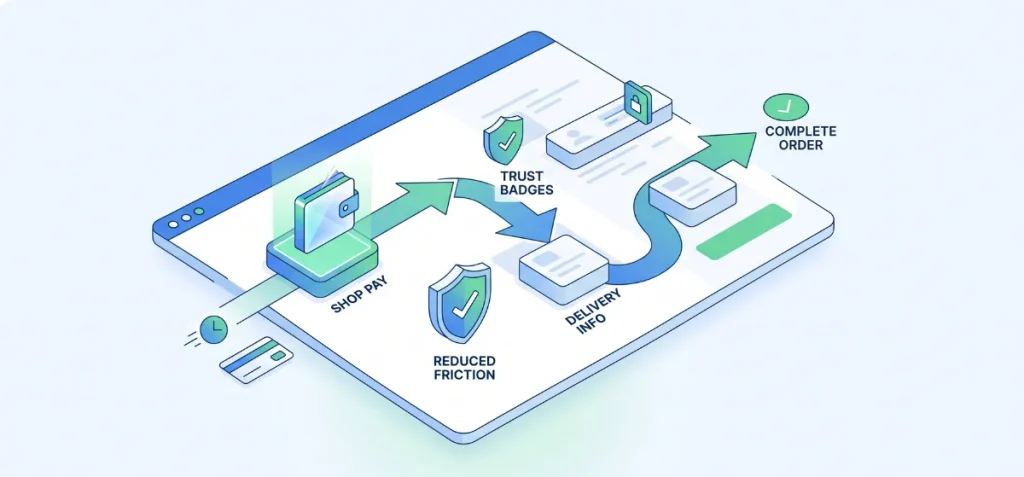
Checkout optimization protects revenue at the final purchase step. Global benchmarks from the Baymard Institute place the average cart abandonment rate around 70%.
Most shoppers leave because of unexpected extra costs, forced account creation, or complicated forms.
Official conversion advice from Shopify highlights two priorities: cut checkout friction and reveal shipping costs before checkout begins.
Accelerated wallets solve input friction. Documentation from Shopify shows that Shop Pay lifts conversion by up to 50% compared to standard guest checkout.
It stores customer delivery and payment details securely across the entire network for instant checkout.
Modern stores should also adopt Shopify Checkout Extensibility. This architecture allows apps to add custom trust badges, delivery instructions, and upsell blocks to designated checkout zones safely.
Certain advanced checkout UI extensions remain exclusive to Shopify Plus merchants. Keep your fields minimal and let shoppers finish orders without friction.
Shopify CRO Testing Roadmap Template
Copy this clean template into your preferred spreadsheet to manage your experiment pipeline:
| Priority | Funnel Stage | Problem | Evidence | Hypothesis | Test / Fix | Primary Metric | Guardrail Metric | Effort (1–5) | Result |
| High | Product Page | Low add-to-cart clicks | Dropdown menus cause color confusion | Visual swatches speed up choices | Launch color swatch tiles | Mobile ATC rate | Return rate | 2 | +8.4% ATC |
| High | Cart Drawer | High cart abandonment | Hidden delivery charges surprise shoppers | Upfront free shipping threshold keeps buyers engaged | Add dynamic shipping bar | Checkout start rate | Gross margin | 2 | +5.1% Checkouts |
| Medium | Checkout | Form friction | Buyers abandon at address input | Accelerated payment bypasses form typing | Enable Shop Pay buttons | Order completion rate | AOV | 1 | +6.2% Orders |
To Conclude
A solid CRO testing roadmap Shopify store owners follow stops the guesswork. You do not need twenty apps to grow sales.
Start with your store numbers. Find your biggest drop point. Fix broken bugs first. Run clear tests on your product pages and offers. Check your revenue per session on every change.
Keep your store fast and simple. Your buyers will reward you with more orders. If you need help with your store strategy, contact us anytime.
FAQs
How Do I Know Which Shopify CRO Test to Run First?
Target your largest validated funnel leak first. Score the problem by potential business impact, data confidence, and implementation effort. Fix obvious store bugs before you test small ideas.
How Much Traffic Does a Shopify Store Need for A/B Testing?
No universal cutoff exists. Traffic needs depend on your baseline conversion, desired confidence, and minimum detectable effect. Shopify warns that small sample sizes create false, misleading test results.
What Should I Measure in a Shopify CRO Test?
Prioritize revenue per session as your north star. Track conversion rate, average order value, and funnel progression next. Check profit margins and return rates as guardrails.